Showing posts with label Individualizing Instruction. Show all posts

Monday, June 1, 2015

Crystal Knows, Digital Footprints, and Personalized Learning

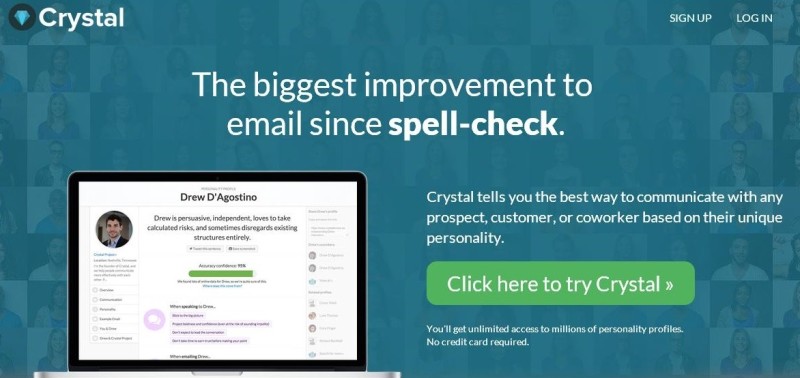
Last week on WNYC's Note to Self podcast (Formerly the New Tech City Podcast), host Manoush Zomorodi focused on a service called Crystal Knows, which I found pretty fascinating. Crystal Knows is an email "coach" that (who?) gives you suggestions on how to best respond to an individual based on their personality type. It determines this by scanning the Internet to look at public profiles and other online content. It then uses algorithms to determine that individual's personality type. This data is then shown to you as you are composing your email, and Crystal also coaches you as you write your response, letting you know whether or not your email is being written in the best possible way to have the biggest impact, make the sale, get your point across, etc.   

On the podcast, one of the individuals Manoush interviews mentions that a similar proprietary personal detection technology is used by some banks to determine whether or not to give an individual mortgage. Manoush observes that 
"every footprint we leave online is like a note in a dossier about us." 
This is yet another great example of why we all need to leave positive footprints online and think before we digitize anything.  When I speak to students about this, I always tell them to only post things their grandma would approve.  

Cyrstal Knows is using information it finds to automatically determine an individual's personality.  I'm sure it will only be a matter of time before there are other programs out that that will determine an individual's likely success in a college for admissions, employability for an HR department, or determine our medical and life insurance rates based on our profiles- where we eat, what our friends do, etc. Of course, all of this probably exists and is already in use, I just haven't heard of it yet!

They discuss how this sort of technology can be creepy to some, as well as whether or not an individual using Crystal Knows should be required to disclose this fact to a recipient. These are certainly intriguing questions to ponder... 

I'm optimistic that as more algorithms are created to categorize humans in all areas, we will better be able to personalize learning in education, too. The more a computer knows about an individual, the better it can target and tailor the instruction to each specific learner.  Already we have the seen the benefits of tutoring programs that can adjust the level of the content and questions to each individual learner.  I'm sure that programs like Crystal Knows can also be used to aid the method of instructional delivery to better know how to reach and encourage each student. It will be exciting to see the next tech thing in this area!

Monday, March 16, 2015

Tip #4- Make Full Use of the iPad as a Formative Assessment Tool


Watch a two minute video about this.
Tip #4 for a Successful 1:1 iPad Implementation is make full use of the iPad as a formative assessment tool. Research from John Hattie (Visible Learning, 2008) points to overwhelming effectiveness that meaningful feedback helps students be more successful and helps teachers better inform future instruction.  Helping teachers understand the multiple ways to use the iPad as an efficient tool to provide formative assessments is a great way to increase effective use of 1:1 devices in schools. Using tools like Google Forms, Socrative, and Padlet (Wallwisher), Kahoot, Poll Everywhere, and many others, teachers are able to collect real time feedback about student understanding and then customize instruction based on that feedback. Teachers continually find innovative ways to provide feedback to the student work in ways that are faster and more efficient than collecting paper, such as using Schoology and TurnItIn to annotate students' assignments and even provide audio feedback.
Before 1:1 iPads, teachers had to rely on quizzes or paper exit slips that were time-consuming to evaluate, which meant that meaningful feedback to students was often delayed by a day or more.  The iPad has been the tool that provides access for students to complete this feedback before, during, and after class. After 1:1 iPads, quizzes and exit polls can be instantly assessed and then used to inform teaching that day or the next.  Plus, all students’ voices can be heard and accounted for when an electronic collection tool is used.  Compared to the traditional method of having students raise their hands to speak and only hearing from one or two individuals, the increased accountability placed on each student and the knowledge gain for the teacher about each of their students is invaluable.

An easy, quick way to get teachers started with simple, electronic formative assessment is to have them make a short three question Google Form with a field for students’ names, a question where students select their hour of class (if the teacher has multiple sections of the same course) and a text box that simply asks, “What is your answer?”  This form can be used repeatedly throughout a class daily to gather the responses of students to any question asked, whether the prompt is displayed on a screen, written on the board, or just stated aloud. There is no need for the teacher to continually edit the form and change the text of the question.  To further speed up the ease of having students open this form up, teachers can have students open the link to the form in Safari, then simply add the page as an icon app to their home screen and title it appropriately, such as “Science Form.”

Here's another great example of using the iPad for formative assessment: teachers can give more immediate feedback to students' topic sentences or thesis statements by collecting them via a Google form, then use FormEmailer to add comments and email them to the student.  This allows the teacher to provide customized feedback to students in an efficient paperless environment. Some teachers have also collected these statements or other items such as lab results or short answers to questions on a collective Google spreadsheet, which has the added benefit of being seen by everyone. The feedback doesn't have to come from just the teacher, either, allowing for more input and reflection by all students, rather than just between one student and the teacher.

There are many other ways to efficiently give more formative assessments and feedback in class and even save time grading.  Besides apps like Socrative, Minnetonka teachers also use Skyward and Schoology assessments online and use the automatically scored multiple choice, matching and true/false items to guide teaching and learning. These testing features even allow for inserted pictures, open-ended responses, randomized questions and teacher comments on student responses. The Schoology app as well as TurnItIn both provide the teacher with an easy, efficient way to annotate students' assignments and even provide audio feedback, all without paper. Getting teachers to harness any or all of these great tools on an iPad is a great way to increase the effectiveness of your 1:1 program.

To learn more about Minnetonka Public Schools iPad Program, check out tinyurl.com/iPadTonka

Monday, November 17, 2014

Tip #1 for a Successful 1:1 Implementation: Execute the Rollout Carefully and Deliberately

Last Thursday I had the opportunity to present at the Ed Tech Teacher iPad Summit in Boston with my colleague Ben Stanerson.  We presented the Top Ten Tips for a Successful iPad Implementation.  Our first tip is to Execute the Rollout Carefully and Deliberately.  It is something I'm continually thankful for as I meet educators from other schools and hear their stories, which quite often seem to be the opposite method--buy everything all at once and implement it at the same time.  Rarely do I hear much about that method that works successfully. Sometimes this disastrous implementation method even makes the news.


Four years ago, Minnetonka Public Schools launched a 1:1 iPad pilot in September 2011 with half of our ninth grade students (out of 750) at Minnetonka High School to create a seamless and dynamic 24/7 educational experience. Because we started small, we were able to focus on just 16 teachers in math, science, and English who worked with these iPad students. The pilot used digital curriculum materials, student collaboration tools and individualized instruction in math, language arts and science — all with the goal of enhancing student learning.  

The goals of our iPad program were to:
  • Enhance and accelerate learning.
  • Leverage existing and emerging technology for individualizing instruction.
  • Promote collaboration, increasing student engagement.
  • Strengthen 21st century skills necessary for future success.


After a successful pilot, the second half of the freshmen class received iPads in January 2012. The program has continued to expand each year thereafter. In year two, all ninth and tenth grade students had iPads. Year three was an expansion to our middle schools, with grade eight through eleven students and over 150 teachers using iPads.  This year we added two more grades, so we currently have 4,500 students in six grades (seventh through twelfth) using iPads.

We attribute this careful, deliberate, and well-planned rollout to our success. Rather than implementing a massive change that affected thousands of users at once in multiple locations, we began at one site with a small group and worked out the glitches.  This allowed us to fine tune our processes, training, and procedures before bringing the project to scale.  

Looking ahead to the future, we also allocated funds to give the entire faculty iPads one to two years ahead of student distribution, which allowed professional development to begin one to two years ahead of schedule. Running the pilot as a controlled experiment enhanced buy-in from all stakeholders. This systematic approach created benchmarks for success and channels for honest feedback. As a pilot, the goal was to learn fast, adjust accordingly, and establish processes for full-scale implementation. I attribute our success to this careful planning and execution. Come see for yourself at our Tenth Annual Technology Site Visit, March 4 & 5, 2014!


You can learn more about our 1:1 Program at tinyurl.com/iPadTonka