Showing posts with label Personalization. Show all posts

Monday, June 1, 2015

Crystal Knows, Digital Footprints, and Personalized Learning

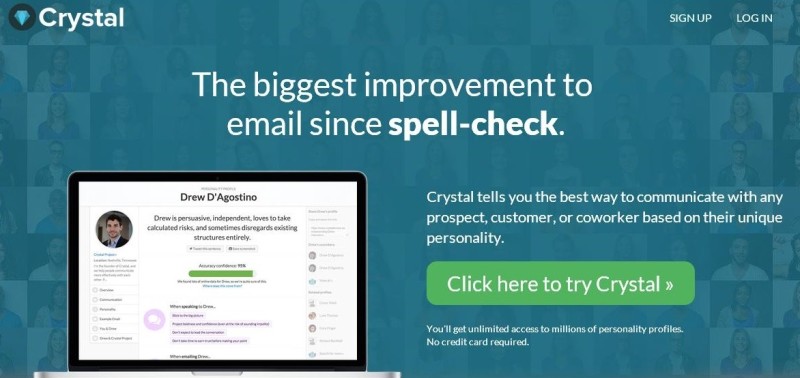
Last week on WNYC's Note to Self podcast (Formerly the New Tech City Podcast), host Manoush Zomorodi focused on a service called Crystal Knows, which I found pretty fascinating. Crystal Knows is an email "coach" that (who?) gives you suggestions on how to best respond to an individual based on their personality type. It determines this by scanning the Internet to look at public profiles and other online content. It then uses algorithms to determine that individual's personality type. This data is then shown to you as you are composing your email, and Crystal also coaches you as you write your response, letting you know whether or not your email is being written in the best possible way to have the biggest impact, make the sale, get your point across, etc.   

On the podcast, one of the individuals Manoush interviews mentions that a similar proprietary personal detection technology is used by some banks to determine whether or not to give an individual mortgage. Manoush observes that 
"every footprint we leave online is like a note in a dossier about us." 
This is yet another great example of why we all need to leave positive footprints online and think before we digitize anything.  When I speak to students about this, I always tell them to only post things their grandma would approve.  

Cyrstal Knows is using information it finds to automatically determine an individual's personality.  I'm sure it will only be a matter of time before there are other programs out that that will determine an individual's likely success in a college for admissions, employability for an HR department, or determine our medical and life insurance rates based on our profiles- where we eat, what our friends do, etc. Of course, all of this probably exists and is already in use, I just haven't heard of it yet!

They discuss how this sort of technology can be creepy to some, as well as whether or not an individual using Crystal Knows should be required to disclose this fact to a recipient. These are certainly intriguing questions to ponder... 

I'm optimistic that as more algorithms are created to categorize humans in all areas, we will better be able to personalize learning in education, too. The more a computer knows about an individual, the better it can target and tailor the instruction to each specific learner.  Already we have the seen the benefits of tutoring programs that can adjust the level of the content and questions to each individual learner.  I'm sure that programs like Crystal Knows can also be used to aid the method of instructional delivery to better know how to reach and encourage each student. It will be exciting to see the next tech thing in this area!

Monday, December 15, 2014

Tip #2 for a Successful 1:1 Implementation: Differentiate Teacher Training

Last week at the Minnesota TIES State Technology Conference, Jen Hegna, Director of Information and Learning Technology for Byron Public Schools, and I presented on 1:1 Professional Development: Beyond Year One. Our presentation slides can be found here. Preparing for a presentation is always a good time to analyze and reflect on current practices as you figure out what to highlight and share. Working with someone from another district is a great way to learn about other options and compare notes.

Too often failed 1:1 implementations make headlines for a lack of planning, including professional development.  Well planned and sustained professional development is a key component of a successful 1:1 program.  Budgeting PD funding and staff not only for the initial roll out year but the years to come is essential.  Better yet, begin the PD a year or more ahead of the implementation!

The training should be relevant, frequent, and differentiated.  In Minnetonka, we have found great success with small group meetings held before/during/after school.  Sometimes teachers meet by grade levels and subjects, and other times by ability and interest.  Providing teachers with opportunities to connect, collaborate, and brainstorm ideas has advanced the level of technology integration we see on a daily basis in our 1:1 program.  We schedule these half-day sessions in August and two to three additional times during the school year, depending on the number of years of experience teachers have. Each of our teachers will receive about nine hours total of training this year, an amount that has decreased quite a bit from four years ago when iPad were so new to everyone--back then it was six full days during the first year!  


Building on our tradition of successful large group professional development trainings during our first years of 1:1, we have implemented a differentiated training model by listening to teacher feedback and working with building administration.  With the integration of 1:1 iPads we found that our training methods had to evolve to better meet the varied needs of all our teachers. In addition, we wanted the training to provide a way to model better practices of classroom integration.  

Over the years, our staff trainings moved away from the stand and deliver format to a more interactive approach that gives teachers opportunity to self pace while learning how to use new technology.  This model also frees the instructor to take on a facilitator and coaching role and better help all user abilities in the same training. Our teachers take part in numerous training sessions throughout the year where they meet, collaborate, and learn with one another to better implement the technology into their classrooms. Teachers on Special Assignment for Instructional Technology (Tech TOSAs) and Media Specialists work closely with their colleagues to integrate technology into all curricular areas, including art, music, business, health, physical education, special education, family and consumer science, media, as well as all core areas. For our teachers with a year or more of experience, a flexible model has been created as illustrated in the flow chart below. Teachers get to choose how they want to spend a third of their PD time, giving them more buy in and ownership of their learning.


They can choose to observe their colleagues teaching for an hour, work one on one with a Tech Coach, meet in a small group of their choosing, or attend a before school session on a topic of their choice. To document this, our instructional technology staff has created a collaborative document which is shared with each teacher to outline their learning and goals for the year, such as the small group planning document pictured below:


In addition to these flexible training opportunities, we have many other ways we help develop the skills of our 1:1 teachers, including frequently highlighting ideas in staff meetings and newsletter type communications, all with the goal of building a common language around iPad integration.  We also have an online Schoology (LMS) group for just our 1:1 teachers, and have begun offering some online learning PD options for teachers, too.