Showing posts with label Filters. Show all posts

Monday, February 12, 2018

Apple iPad/iPhone Guided Access & Restrictions Available for Teachers & Parents

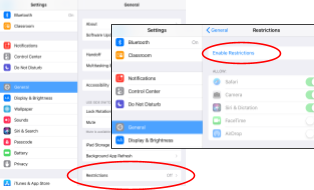
Three years ago I wrote about Apple's Restrictions as a great option for a Quick & Easy Cell Phone Web Filter for Kids. Restrictions allow users of iPhones or iPads (or the teacher or parents of users) to limit the ratings on apps, movies, TV shows, block explicit lyrics on Apple music and podcasts, prevent app installs and/or deletions, block apps, limit adult content on websites, and block certain websites. Restrictions are something I think all parents should have in place if their child has an iPhone or iPad. For Android users, start here.

In Minnetonka, we have already set Restrictions in place for our students on their school issued iPads through our MDM (Mobile Device Manager). Minnetonka school iPads also have school filtering software in place blocking access to inappropriate sites regardless of whether the device is at school or off campus. In addition to the built-in filtering on students’ iPads, teachers and/or parents of grade 6-12 students may also consider using additional Restrictions, including blocking websites such as YouTube if necessary.

YouTube has many educational videos and teachers use it regularly for instruction. Blocking YouTube prevents a student from accessing these resources, completing homework and learning. Many things can be both entertaining and educational. While teachers work with students about appropriate and responsible use of tools like YouTube, the District also encourages parents to help guide their children in exploring this aspect of technology, as navigating such sites is becoming a necessary skill for their future. The District's position is that restricting access to YouTube should only be used temporarily with a goal of getting students back to managing it without restrictions and balancing their use of the tool for entertainment with the need to complete homework in a timely manner. View our instructions on setting up Restrictions.


Another option available to students and parents is to use Guided Access. Guided Access temporarily limits iPad use to a specific app or allows teachers and/or parents to set up time limits for iPad/iPhone use. View instructions on Guided Access.

Related posts and information:


        Monday, April 25, 2016

        Happy Sweet 16! Now You Can Snapchat. (34% of Parents Don't Allow It Until High School.)

        Image Source: Social Times
        Our oldest daughter just turned sixteen. She has been asking for a Snapchat account for a few years now. Until now we have said no.

        As I poll students at the presentations I give around the state, about two years ago I started seeing Snapchat surpass all other social media tools used by tweens and teens. Despite its popularity as well as our daughter insisting that we were unfair (and that she was the only one without an account), we held off. We certainly had a lot of discussions about it and my wife and I spent a lot of time reflecting on our decision and beliefs. 

        We haven't allowed Snapchat for two main reasons. One, we are concerned about the inappropriate content and sexting that an app like Snapchat could potentially encourage. We trust our daughter and she is a great kid, but research has shown that not everyone uses Snapchat appropriately. It is quite likely that she might receive inappropriate content even if she doesn't want it. An app like Snapchat that leads users to believe that technology is temporary is often in the news for negative reasons. Second, we want to help our children maintain a healthy balance in the amount of entertainment/social screen time in their lives, and we know that having yet another social media tool will likely take up more time, not just replace time already spent on Instagram or texting with friends. 

        I know that by waiting we have been more conservative than some parents. In fact, I know of some elementary students with smartphones that use Snapchat. When we recently randomly sampled our grade 5-12 students' parents and 528 of them completed the survey. One of our questions was "At what grade level do you think it is appropriate for students to begin using social media tools like Instagram, Snapchat, and Twitter?" Here are the results:

        5.6% think upper elementary is appropriate

        53.1% think middle school is appropriate

        34.3% think high school is appropriate

        7% say it's not appropriate


        Image Source
        So according to the data, we are in the minority of parents who have held out. We've been OK with that. A few years ago we had a parent/community book read on Dr. David Walsh's book, No: Why Kids--of All Ages--Need to Hear It and Ways Parents Can Say It. We found the book and Dr. Walsh's advice helpful, and believe it is important to not always give in. Our kids will be stronger and more resilient people because of it. As a parent, it can be tough to hold your ground. As stated on the Amazon book description, "Although saying No to your child is obviously important, many parents still have a hard time following through—even when they know they should—especially when other parents and the culture around them are being permissive."

        As I've written in the past, I believe we should gradually and slowly expand the technology tools and freedom our kids use after practice and success (see How much should parents snoop?) For example, we waited until she was 12 years old to get her a phone (see Best Age to get a Smartphone), use Curbi so her phone is filtered (more on Curbi here), and until she was 14 and in ninth grade to allow Instagram (see Raising JOMO kids in a FOMO world). We also keep tech out of the bedroom at night. We continue to have frequent conversations about using technology and social media appropriately. 

        As she has proven she is responsible we have allowed more tools and given her more freedoms. Now she is 16 and has a drivers' license. As difficult as it is to let go, we plan to continue to guide her on the path to adulthood. It's hard to believe she only has two years left with us before she is on her own. We hope that the guidance we have provided will give her a solid foundation for making wise decisions.  Who knows, maybe some day she will even thank us for it!

        Related posts: 


        Monday, March 28, 2016

        Best Age for a Kid to Get a Cellphone with Internet Access

        February 2016 Grade 5-12 Parent Survey
        One of the most frequent questions I get asked when I speak around Minnesota with parents about kids and technology is, "What's the best age for a kid to get a cellphone with Internet access?" Last month, we randomly sampled our grade 5-12 students' parents and asked this very question. 528 parents completed the survey.

        Almost one fourth (23.3%) of parents think that waiting until high school (grade 9-12) is best.


        One third of parents believe that Grade 6 is the appropriate time for students to start having a cellphone with Internet access; 62% overall think middle school is when to start (grade 6-8).


        Only 13.6% believe that it is appropriate for elementary students to have a cellphone with Internet access.
        Less than 1% (0.8%) believe it is not appropriate.
        This topic/question has changed over the past 10 years. It used to be the kids would get cell phone that could make calls and parents would ask me when their child should have text messaging, too. Some parents still began by getting their child a simple phone with just a text messaging plan, but many parents today skip this altogether and their child just starts with a smartphone with full Internet access. Often times the phone is a hand-me-down from a parent or older sibling.

        Nearly one third (31.3%) of parents have a filter on their child's cell phone that blocks inappropriate content.

        February 2016 Grade 5-12 Parent Survey
        Before giving that first phone with internet access to a child or teen, parents would be well-served to pause and intentionally plan for safety. Providing any cellular data plan means giving your child the keys to unfiltered internet access--the good, the bad and the dangerous content of the world wide web. Most parents would agree: Kids shouldn't have unfiltered access to the internet. Personally, my kids received a phone with filtered internet access when they turned 12. We use and I have recommended Curbi in previous posts. I'm willing to pay $7/month for the comfort and peace of mind in knowing that my child's connection to the Internet on their personal device is filtered. Parents of younger children with smartphones may want to consider the built-in web filtering options of Restrictions right in the Apple iPhone or Android device for free, but this often blocks so much content that older students won't like it and complain. Restrictions was the most common solution listed by parents in our survey when we asked them what product they used for a smartphone filter.

        “Everybody has one.”
        “Everyone else has....” Perhaps the most persuasive words in the English language, “everyone else” has been the rallying cry for children trying to convince their parents to allow something for decades. Your child may tell you that they are the only one without a cellphone or perhaps without an iPhone. S/he may state that everyone but her/him has Internet access. Or perhaps your child says that no one else's parents have put a filter on their smartphone. This data proves that is not the case; even some upperclassmen don't have phones with Internet access, and of those that do, many are filtered. 

        Related posts: 

        Monday, February 29, 2016

        Easy Ways for Parents to Keep Tech Use Positive- Teacher Conferences Handout

        Last spring, Deephaven Elementary Fifth Grade teachers piloted using spring conferences as an educational opportunity to talk with parents about cyber-safety in conjunction with our digital literacy curriculum. The face-to-face conversation was more beneficial than sending out an email or simply sending this information home in backpacks. 

        Link to PDF
        This year we expanded this practice to all of our elementary schools.  We had a one-page flier of easy ways parents can help their children with technology which we printed and teachers handed to parents at conferences. Teachers were encouraged to take a minute for a personal conversation with parents about the importance of proactively protecting children online.

        Spring of fifth grade is a crucial transition stage of children’s lives. We want to encourage parents to do three things:  1) Talk to their children about ethical use of personal devices and 2) install filters on home WiFi and 3) use restrictions on devices. We suggested to teachers that if they had personal experience about the benefits of using the tools listed in the handout that they would share these with their students’ parents.

        Our District Digital Health & Wellness Committee has a goal of getting more 
        parents to use restrictions and filters to protect children from inappropriate content in a mobile world. We’ve learned that many parents have never considered the possibility of their child accessing porn or other material on personal devices. They assume all devices are filtered, like our school filters the internet, and that is not the case unless parents take responsibility for turning on filters and restrictions.
        64% filter home WiFi
        We started surveying all parents two weeks ago about technology and included filter related questions. Of the fifth grade parents who have responded so far, 64% stated they have a filter on their home Wifi and 63% have a filter on their child’s smartphone if s/he has one. We will be doing a post survey of 5th grade parents after conferences and are hoping for an increase in numbers after the teachers' conversations with families. 


        Related posts: 

        Monday, January 25, 2016

        Five Ways to Raise Digitally Balanced JOMO (Joy of Missing Out) Kids in a FOMO (Fear of Missing Out) World

        This weekend I took one of my daughters to an exciting high school girls' basketball game, watched three of my kids play in their own basketball games, went both rollerskating and ice skating with my family, went for a run with a neighbor, went to church, took a couple long hikes in the woods with the dog, and more. I took a few pictures and some videos, but didn't post anything on social media. Had I not written about it here, no one would outside my family would have known. I'm OK with that. And I hope to help my kids understand that this is OK, too.

        My surprising personal results from the FOMO quiz, despite
        answering most questions with "Not at All" or "Slightly True"
        Over the past few years I have been decreasing the frequency of both my own posts as well as how often I look at the post of others. During that time, I've read more articles about both FOMO (Fear of Missing Out) and more recently learned about JOMO (Joy of Missing Out) which have helped me think about how I spend my time and what I share with whom. Recently in another intriguing and thought-provoking Note to Self podcast, Manoush Zomorodi interviewed the creator Caterina Fake, originator of the term FOMO along with Anil Dash, the creator of the term JOMO. I found the conversation fascinating, and could relate personally to much of what they were saying about how and why people use social media, as well as the joy that can be found in not being distracted by trivial information and news. 

        Last year as part of my New Year's resolutions, I set a goal to decrease digital distractions, nocializing and FOMO by turning off as many notifications as possible on my devices. I wanted to take control of how often I checked social media tools like Facebook and Twitter as well as email, weather alerts, sport scores, and more. It has been great. A year later, I am certainly not "cured" but definitely less addicted. Making the effort to decide when to open these apps versus allowing them to interrupt and push alerts at me has made a huge difference. I would encourage you to do the same if you haven't already.

        I have also been reflecting on how I can help my own children. I think there is a need for us as adults who remember life before social media to help our children understand that not everything needs to be documented and posted. We can help them learn that it is OK not knowing and seeing what others are doing, and you can find freedom, meaning, and even joy in living life without posting about the experience. So, what can we do to help raise digitally balanced JOMO kids in today's FOMO world?  
        Source: Bizarro Comics
        1. Model healthy, balanced use. Closely examine our own habits and lives to make sure that we are modeling for children what a healthy balance and use of technology is. In the past I have used the word techcognition to describe a one's self awareness of how technology is used. We need to pay attention to how often we are on our own devices, especially around our own children who are watching us and learning from the model we set. Decrease digital distractions, nocializing and FOMO by turning off as many notifications as possible on your devices.
           
        2. Be where your feet are, as one of my colleagues says. Don't look at your screen when you're with your kids, spouse, or family. Try it. When you do something together, don't post about it. Experience and enjoy life together with them without needing to post that you did this, modeling that a post (boast?) isn't necessary.
           
        3. Limit entertainment screen time, whether it is Netflix, video games, or social media. At our house, we have set up entertainment screen time limits of about 30-60 minutes a day. We don't have screens on during meals, don't leave the TV on, and don't have the latest video game systems. When our kids have had their entertainment screen time for the day, we encourage other activities (a board game, LEGOS, ping pong, outdoors). We also use Curbi to filter our children's smartphones and keep tabs on usage, sparking conversations (next tip).
           
        4. Have frequent conversations about FOMO and JOMO with our children. If we don't discuss this with them, I'm not sure they will ever learn about it. If we had grown up in this socially connected world, would it be possible to even realize the effects of FOMO? Can you even realize something can be different unless you are prompted by someone or experience another way of doing something? As parents, we can be this prompt for our children. Question them about what they post, what their friends post, how they feel about it, how much time the spend looking at posts, who they are connected with in their networks, and so on.
           
        5. Don't rush into social media. The official legal age to begin using social media tools like Instagram, Twitter, Facebook, and even Snapchat is 13. There is no need to rush into this. In our family, we have held to this and actually not allowed our children to begin using social media until they are in high school. At school we have some great tools that help prepare students to use public social media tools appropriately, such as Schoology, our private social learning management system. I do not see any reason to have kids begin using public social networks earlier than 13. Even at age 15, the only social media tool my daughter uses right now is Instagram. Sure, there were requests from her to begin earlier, but we knew she would have plenty of time in her life to use social media. We believe starting off slowly and forming good habits is important and will benefit her in the long run. 
        Do you have other tips or ideas about this? Please let me know. 

        Related posts: 

        Monday, September 7, 2015

        District Digital Citizenship Committee: Tonka Schools Campaign to Raise Awareness of Cyber Safety at Home

        An article in our local newspaper last week mentioned our efforts to get the word out about cyber safety and digital citizenship to our community: Tonka Schools Campaign to Raise Awareness of Cyber Safety at Home. The article focusing on filtering options and suggestions.  It mentions that our school-issued iPads for grades 5-12 have a built in filter that works regardless of whether or not the device is on or off campus. We are still working to help our parents and the community as a whole understand the need for a filter on a cellular device, and the article details Curbi as a solution for this, which I have mentioned in the past. I have yet to find a comparable working product for Andriod--if you know of one, please share! This was a great quote about filters from a Minnetonka parent in the newspaper article:
        Even smart kids make poor choices. Kids are curious. This is an opportunity to allow your kids a safe way to explore the Internet. Then you can let out more line as they show responsibility and gain respect for the technology. It’s training wheels for a powerful tool.
        I've mentioned in past posts that we have a Digital Citizenship Committee (Parenting with Purpose in the Digital Age... It's Complicated and Managing New Devices Received at the Holidays). This group is working to increase awareness and engage students, staff, parents, and community in raising responsible digital citizens of the future. We are using a positive community norms framework to define needs and norms among our students, staff, parents, and community for safe and appropriate technology use. The group seeks to guide and promote the importance of teaching everyone the necessary skills of digital citizenship and do so in a multi-medium, frequent and repeated way. The committee members serve as eyes and ears in the community, keeping a pulse on awareness and issues and serving as a champion for responsible digital citizenship.

        This Digital Citizenship Committee is composed of a variety of school staff (teachers, media specialists, instructional technology coaches, technology admin, principals, communications director), parents, and community members (a pediatrician and a child psychologist). We meet quarterly to plan the best methods for message delivery to not only students, but also parents and our community through a variety of methods, including tips on our District Facebook page and Twitter account.

        A few times a year we offer parent ed presentations on raising digital kids and parenting with purpose. We provide many resources to our parents and community on our District websiteOn a 2015 survey, our students' parents were asked questions related to technology use at home/outside of school. This data was gathered for the District’s Digital Citizenship Task Force to review current practices and provide a baseline for the future. We found that:
        • 49% report that they have installed a filter on their wireless internet access at home that blocks inappropriate websites, an increase of 8% from 2012.
        • Agreement with the statement “Communication from teachers and administrators regarding the iPad have helped our family to develop productive strategies for home use of the device” increased from 56 to 60%.
        • 30% of parents report that their child has a cellphone with internet access WITH a filter that blocks inappropriate websites.
        • 56% of parents report that their child usually keeps an iPad/cell phone or personal technology device in their bedroom overnight.
        This fall our Digital Citizenship Committee is planning to promote the Kindness in Chalk Day on Friday, October 9 as part of National Cyber Safety Awareness Month and National Bullying Prevention Month. We are partnering with area community organizations to do this, such as local doctors' offices, banks, churches, and more. This is just the beginning of another year's worth of efforts to help foster conversations and increase awareness about techcognition- how both kids and adults balance their use of technology in today's digital world.

        More information and resources can be found at tinyurl.com/CyberResources.

        Monday, June 15, 2015

        Coming Soon: MiPhone X with a Conscience Helps You T.H.I.N.K. Before You Post

        MiPhone X with a Conscience
        Helps You T.H.I.N.K. Before You Post

        We're fortunate in Minnetonka to have very talented and creative staff and students. One of these individuals, Andy Smith, is our A/V Production Specialist. Part of his job is to produce messages for the high school morning news show, including messages around Digital Citizenship. His most recent creation to get our students to T.H.I.N.K. Before They Post is about the 
        MiPhone.  The MiPhone is a futurist smartphone with a conscience that helps with posting appropriately and keeps its owner from getting into trouble or having digital regret.  The video does a great job of getting students to reflect on what they digitize and communicate in a humorous way.

        The video first appeared on the high school morning news show at the beginning of June 2015.  The Beyond 140 series is a regular feature of the high school principal, Jeff Erickson, who with Andy's help, uses video to deliver messages to the 3,000 Minnetonka High School Students that go beyond the limitations of 140 characters of his Tweets. The student actor in the video is Eric V., a talented senior who just graduated. 

        Find more resources about Digital Citizenship here.

        Monday, May 11, 2015

        Petition to Urge Cellular Carriers to Provide Parents with Content Filters on 4G LTE


        You’ve probably heard the advertisements from Verizon that parents who purchase cell phones for their children are offered content filters to protect children from pornography, drugs, alcohol and other inappropriate content. But WAIT. If you provide your child with a smartphone on 4G...no such filter exists through your wireless carrier.


        Verizon's Advertised Free Content Filters "Set boundaries to help ensure your kids can view only age appropriate content from their wireless device."
        Many parents today ‘hand-down’ smartphones to their children when the parent upgrades their device. Doing so provides full, unfiltered access to the internet through cellular carriers. The carriers recognize the need to provide safeguards for youth and do so on 3G devices. In fact, they have undoubtedly spent thousands advertising these parental controls for parents, but only make them available on older technology models.


        Verizon's fine print on a MyVerizon account page: "The cell phone associated with this  number is not compatible with the Content Filters service. If this a 4G LTE device please check back at a later date as we are currently working to make these devices compatible."
        Cell carriers need to keep opt-in content filters up to date with all models of devices available and used by children today.  Even better, carriers could collect the birth year of the individual using the account and match the age appropriate content allowed to the device with the age levels they already have established.  


        Too many parents are unknowingly providing an on-ramp to developmentally inappropriate content by purchasing a smartphone for a minor, only to discover that advertised content filters don’t work on 4G devices.

        Please join me in signing this petition to urge cellular carriers to offer opt-in web content filtering for 4G LTE devices. Child safety needs should keep up with the evolution of technology. Socially responsible companies need to take action to protect children.

        Monday, April 20, 2015

        Technology & Relationships


        This month the pastors at my church, Westwood Community Church, are focusing the messages on technology based on a book titled “The Digital Invasion: How Technology is Shaping You and Your Relationships” by Dr. Archibald Hart and Dr. Sylvia Hart. Yesterday I was interviewed by Pastor Joel Johnson during the message at each service. We discussed digital footprints, filters, fragmented focus, solitude, digital yawns, parenting high tech kids, and more. I explained how last fall, because my five year old daughter pointed out how much time I spend on my phone, I made changes to limit my own screen time and distraction and shared my tips for dealing with this. The video of this interview is about 15 minutes long.   


        You can start the video from the beginning if you'd like to here the entire message from Joel about how technology affects our relationships. He has some great insight about the importance of solitude with a great Henri Nouwen quote and an outline of the five benefits of solitude. Joel also gives a great overview of Sherry Turkle's TED Talk: Connected, but Alone?  If you haven't watched it, do!

        Cyber Safety: Catching Up With High Tech Kids On Thursday, April 30, from 7–8:30pm, I have a parent ed class scheduled at Westwood.  If you are in the area and able to attend, please register online (it's free). Invite others, too.

        Tablets, Smartphones, Twitter, Instagram, Snapchat, Vine, Minecraft... Technology is a big part of our kids’ world! Keeping up can be challenging, but a positive and well informed approach can have a big impact on your child’s future and habits. Learn how to help your kids develop a balanced and healthy use of technology. Get tips and ideas for maintaining open dialog about technology and understand the significant role you play in helping your child be responsible and safe in today’s high-tech world. Numerous ideas and free resources will be shared.  

        Past related posts: