Showing posts with label math. Show all posts

Wednesday, May 19, 2021

EdPuzzle: Engaging Students in Effective Learning Through Video


Over the past few years prior to the pandemic, a few of our teachers tried out various tools which allowed them to assign students video content to watch and assess what they understood. After some researching and testing at the start of this current school year we added a paid subscription to one such tool: the pro version of EdPuzzle. We figured teachers would want to do this more often during distance learning. As this year draws to a close the numbers show we were correct. Our teachers have created more than 4,300 EdPuzzle video assignments. Over 100 of our teachers have used it more than ten times this year, averaging thirty or more videos uploaded, and almost ten of those teachers have created more than 100 video assignments with EdPuzzle. Recently I met with five teachers to learn more about how they use it to enhance their instruction:

English

High school English teacher David Adams uses EdPuzzle regularly with both his online eleventh grade English students as well as his in person journalism and English classes. David records a 1-5 minute unit overview video, providing students with a framework of the learning ahead—what they will learn and what the assignments will be. He also creates a video for each week’s lesson. With EdPuzzle, David can prevent students from skipping ahead in a video and he adds a question at the end of each video overview to test whether or not they have watched it. 

David says that these video overviews are nice because students can get to know him and see his face more, especially the online students. Since starting the regular use of video, he has experienced more online students whom he hadn’t met in person coming up to him and talking with him when they are at school for other in-person classes. He likes the fact that he doesn’t have to re-explain things for absent students—instead they just watch the video and stay caught up versus waiting to talk with him at the next class. This saves both David and his students time. Students can also go back and rewatch videos as needed, which greatly helps support the students’ individual learning needs and prevents them from having to wait to meet to get many of their questions answered. Sometimes he will replay a video on the screen during class (such as a grammar lesson) so students who need to can rewatch it, which frees him up to meet with students.

Math

Fifth grade math e-Learning teacher Grace Mevissen “loves EdPuzzle.” She uses it regularly with her online students. It has allowed her to do more flipped learning this year, posting math mini-lessons for students. Grace can see from the EdPuzzle stats that some students watch the video a day prior, and sometimes encourages them to watch the videos multiple times. She can also see when students haven’t watched a video and/or when they only watch part of it. Grace has found it very beneficial for students to be able to watch the video of a lesson if they missed the live instruction session, which like David mentioned, saves time and keeps students caught up.  

Grace likes the library feature in EdPuzzle with premade videos with questions which she can quickly edit as needed rather than having to “reinvent the wheel.” For example, she has found Mr. J’s math videos to be well done and uses this content frequently. Grace’s colleagues Jennifer Hahn and Lisa Lund use EdPuzzle as well to augment their social studies and health curriculum. Sometimes the EdPuzzle quizzes are used as “exit tickets” to formatively assess how well the students understood the lesson. Grace mentioned that in addition to EdPuzzle, she uses a lot of other tools such as Classkick to watch kids’ work in live time and send messages to correct misconceptions. She also has noticed how much more tech savvy students are now, easily able to jump between apps on their iPads.

World Languages

High school Spanish teacher Briana Wilson uses EdPuzzle with both her immersion and regular language classes. It provides a great way for students to hear authentic audio and be able to process at their own speed as they answer questions about what was said. Briana has students listen to a wide variety of topics and asks them questions to keep them engaged, which “automatically increases the active role they have to play as a learner.” EdPuzzle is a great tool to select specific portions of a video, such as one minute of a 15-minute clip. Briana explained that a one minute video with questions will take the students five minutes to watch and re-watch and then answer the questions.

Briana likes being able to import anything from YouTube into EdPuzzle, shorten it to what you really want the students to listen to, and add questions. She and her colleagues use the library to share and edit one another’s video assignments. To accompany a long 450 page novel her Spanish Humanities students are reading, she took clips from specific scenes in the movie so students could compare it with the book. She finds that the students are more motivated to read the next section, as reading a book in a second language can be very tedious. Briana also sets EdPuzzle up so students can see the correct answers, and explains that using it this way is “rewarding for kids to have the validation that they are understanding the content and language”. 

Spanish teacher Fred Moreno-Parra also finds the video library in EdPuzzle to be a time saver. He finds videos where students can see and learn the language in context, such as when traveling or learning about holiday traditions. Fred says EdPuzzle is great because he can find, edit, crop and insert questions into YouTube videos and it removes ads. He says this saves him “tons of time” when using a pre-made two minute video rather than having to spend time making his own, and often the videos available look more professional with graphics and animations than what he feels he could produce. Fred finds that the videos are more engaging for students when learning about important and complex but less exciting topics like verb tenses. He has found the EdPuzzle video format helps his students better learn the material.

Related Posts:

Monday, February 3, 2020

Middle School Algebra Students Design and 3D Print Bubble Wands


About five years ago I heard George Couros mention the “Twitter Factor” when referencing how you could walk into a classroom and determine whether or not the teacher was active on Twitter. If s/he was, then observers would likely see innovative ideas and best practices that were being shared online. I was reminded of this recently when I was in one of our middle schools and saw students highly engaged at work on an amazing project. I learned that one of our math teachers, Jon Westmeyer at Minnetonka Middle School West, had first seen the idea for this lesson on Twitter and then worked with Cindy McGlasson, math teacher at East Middle School, and three other colleagues to adapt it for their students.

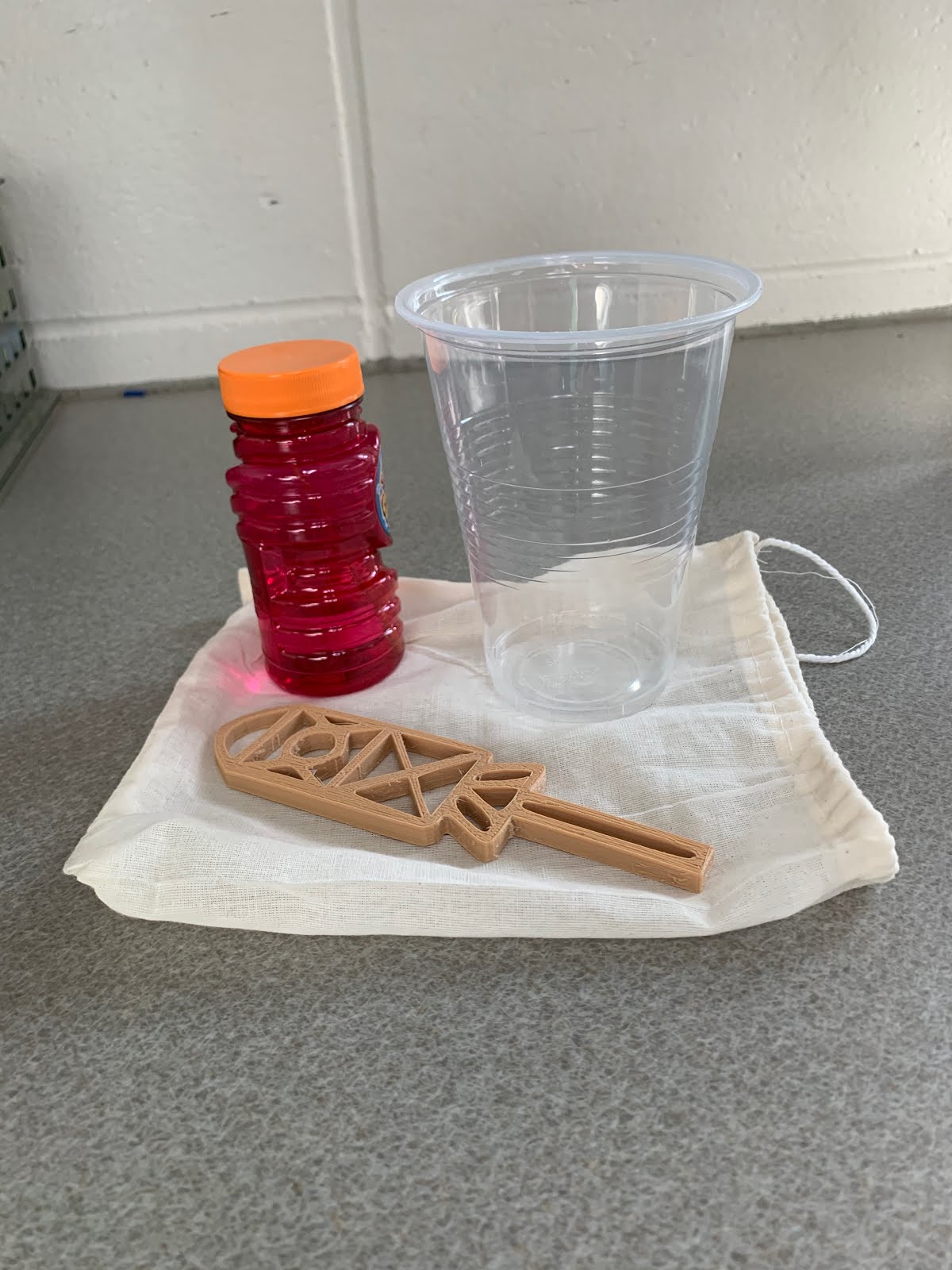
The teachers wanted students to “recognize and represent linear functions in real-world and mathematical situations.” To accomplish this, the seventh and eighth grade Algebra I students at both of our middle schools work with a partner to design bubble wands using linear equations which they print out on 3D printers and give to patients at a hospital or foundation of their choice. They put their wand in a small gift bag along with a bottle of bubble solution and a letter they write to cheer up the patient/recipient and explain what they learned in this process.

When I was in Cindy’s math class a few weeks ago I was able to see firsthand just how excited the students were with this project. She explained to me that the students in the 8th grade Algebra classes (4 of the 5 teachers) are grade level math students and, in the hour I visited, 1/3 of the students are also in her Algebra support class. “So the project is a great opportunity to add rigor and engagement for classes which might have defaulted to more rote learning in the past.”

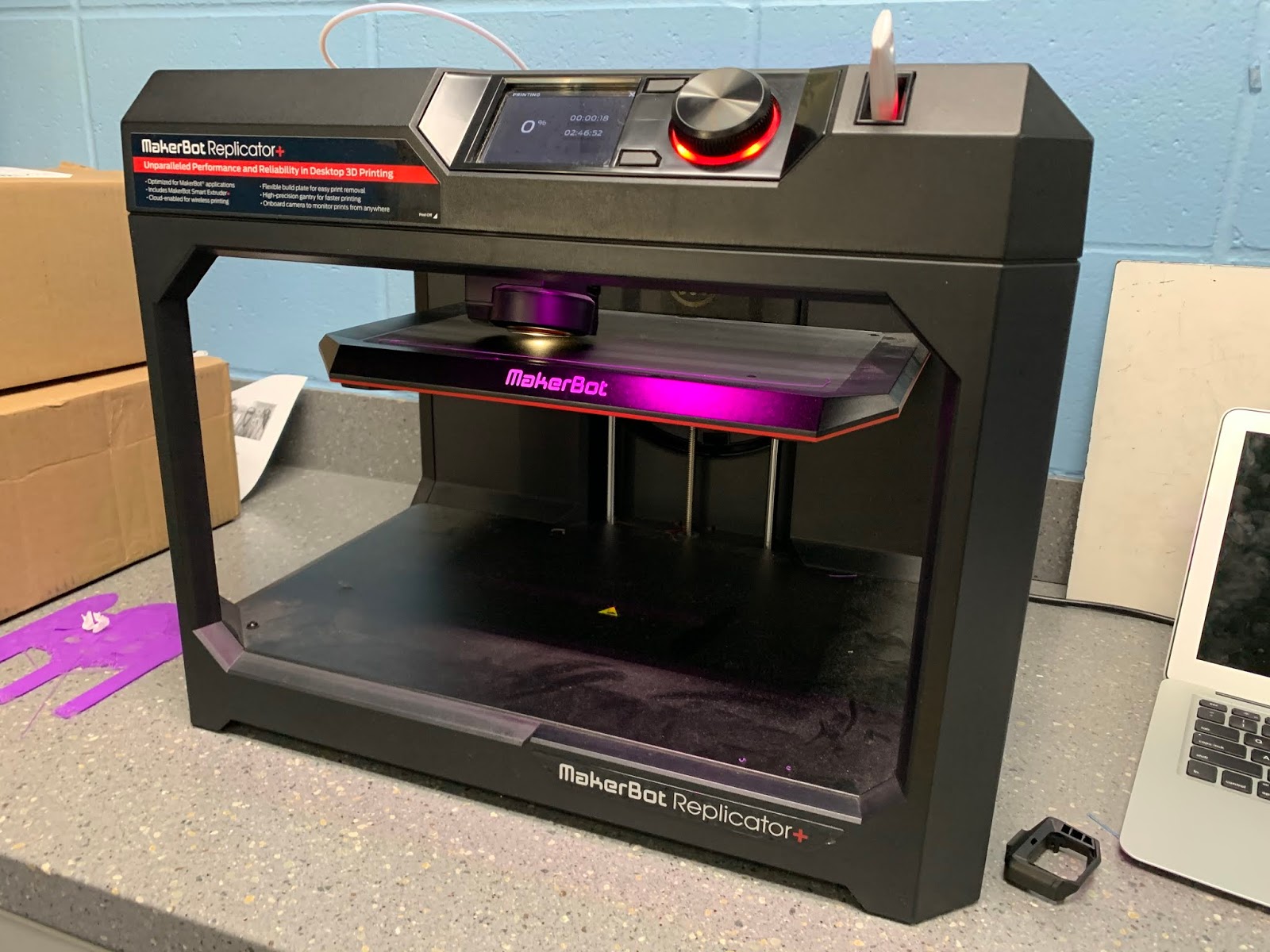
To design their bubble wands, the students first figure out linear equations to create the lines and curves needed to make the shapes in their bubble wand design. They use the Desmos app to do this. Then they use Selva3D to transform their 2D image to 3D. Afterwards, they import this design to Tinkercad to finalize it for the MakerBot printer. Their full instructions can be found here.

Below are a few student comments that came from an open ended survey question asking, “What else you might want to share from your experience?"
I really enjoyed the creativeness [sic] of this project, and the idea that we could be doing something for other people. It was a great break from normal solve equations, check work, solve equations, check work, while still being educational, and helpful.
I had lots of fun working on this, and going through all the challenges me and my partner faced.
It was sooooooo much fun and it really helped me with my lines. You guys should do it every year. It was cool to do something different that still helps you learn lines in a better/unique way.
I think this was a great project, not only to expand our understanding of lines and graphs, but also because we were doing this for a good cause.
This work is done as part of our School Board’s Goal #2: To continue to work to expand experiential learning and inquiry-based learning opportunities for E-12, including infrastructure and resources required. To help with this, last spring “Framework Grants” were awarded in which Minnetonka teachers could apply for funding to support such projects. (Learn more about the Minnetonka Framework for Teaching and Learning.) 

According to a report to the Board on January 20, “these grants encouraged those with ideas and initiative to create compelling student experiences with District support. Grants provided teachers paid planning time, a process to request funds for supplemental materials, training, and the support of a coach. 27 teacher teams chose to attend training and engage fully in the process. To date, 15 projects have been planned and have either been implemented with students or are waiting for the proper time in the curriculum sequence to do so. Remaining grants are in varying stages of planning and implementation.” 

Another example of a Framework grant is  Grade 2 Chinese Immersion students learning the cultural background of Chinese shadow puppetry--they learn and apply Chinese language arts skills by writing original scripts and performing shadow puppet plays for an audience. Students create their own shadow puppets and props in the Chinese tradition. 

Related Posts:

Monday, January 6, 2020

15 More Examples of Meaningful Coding Across the Middle School Curriculum

Back in December during the International Hour of Code, we asked all of our middle school teachers to include a coding activity tied in with their curricular area and share with all teachers what they did by posting to a Schoology Group. Below is a sampling of what was done at both of our middle schools along with some of the photos they submitted. As you can see, there was great variety and creativity involved and teachers tied it to their curriculum, from language arts, music, math, science and more. A big thanks to our participating teachers and to our middle school computer science teachers, Lisa Reed and Michelle Pease, for encouraging colleagues to explore the opportunities for integrating coding into their curriculum. 
  1. My 8th grade geometry students used Spheros to calculate polygon interior and exterior angles, and programmed their bots to draw pictures. 

  2. I had my 7th grade Comp Math students work on coding the coordinate plane. Students were able to learn about the coordinate plane and coding through this Codesters activity. They had a great time! 

  3. 8th grade Global Studies students at MME coded flags of the world today! Fun times coding Libya then going for more challenging flags of Ukraine and Germany. Some students designed and coded their own flags.
  4. Students are currently reading The Cay by Theodore Taylor in 6th grade LA class. The book lent itself well to a connection about WWII, Alan Turing and the Enigma code in spirit of Code Week! They learned what encryption is and how to decrypt messages just like Alan Turing did during WWII in the fight against Nazi Germany. Students attempted to decrypt the attached cryptogram, and some were successful! Those that finished could extend their knowledge of Cryptography with Swift Playgrounds: Cipher. The conversations spurred from this lesson were not all focused on coding, but the life of Alan Turing brought rich conversations about history, persecution, and humanity that brought great value to the class. 

  5. My classes are participating in code week this week. Today we did a coding Breakout EDU. Tuesday and Wednesday we are using Spheros and Thursday we are doing Swift Playgrounds. On Friday we are ending the week with a coder speaker.
     
  6. In my social skills class we did an hour of code using Breakout Edu. The students had to work in partners to problem solve various puzzles and codes. It was a great way to observe collaboration skills and their ability to persevere through frustration!

  7. I had students code a health super hero that would rescue someone from drug use. My 6th graders were really creative. One student coded a grandma figure that went into schools and talked to kids about how drugs have aged her. And even though she looked old like a grandma, she actually was not as old as she looked because of her drug use. So fun to see their creativity!

  8. 6th Grade LA coded Homophone stories - the requirements were three sets of homophones that were different and a story that made sense! Many kids had a lot of fun with this!!

  9. 7th grade Spanish Immersion LA students created story maps to retell fairy tales. They programmed Ozobots to follow their story maps.

  10. In 7th grade life science, students had the opportunity to explore the Code.org website tutorials. Many a Flappy Bird game were coded this day.

  11. In 8th grade earth science the students played with the different Hour of Code Activities! Some of them created their own games! 

  12. In Band 8, we worked on coding the music of Franz Lizst. A great activity to do right after the concert!!

  13. In Language Arts, students created a PSA with Codester.com. 

  14. In comp math students were coding a snowman with coordinate points. 

  15. In our language arts hour of code, students are coding mini narratives! Students code to establish character and setting in a short story.
To learn more about coding in Minnetonka K-12, please see some of the related posts listed below:

Friday, November 22, 2019

20 Examples of Makerspace Projects in Minnetonka Classrooms


Minnetonka's Makerspace, called "The Hub" is now in its third year. Makerspaces are “are informal places or materials for creative production in art, science, and engineering where students of all ages blend digital and physical technologies to explore ideas, learn technical skills, and create new products” (source).  The Minnetonka Foundation has invested in materials and equipment at each of our six elementary schools plus our two middle schools. More about the Foundation here. Read more about the original launch here.

To encourage teachers to integrate the materials into their curriculum, professional development has been offered over the past two years, including August classes and even through a summer online course. Teachers have had opportunities to use the materials during these trainings to get more comfortable with the possible activities and gain ideas on how to use them. One page guides on how to use materials in The Hub were created. Some of our Spanish and Chinese immersion teachers even provided translations for the task and challenge cards that were created during the initial curriculum writing phase of year one. We also have a Schoology course for teachers to share ideas with one another. 

Tarah Cummings, part time Teacher on Special Assignment for The Hub, took 20 ideas our teachers shared using The Hub materials and put them together in a great Adobe Spark VideoAs you watch the video, you'll see some of the great ways that our teachers are integrating Hub tools into their curriculum in actual projects and lessons that have been taught at the elementary and middle levels in a variety of content areas. 

Each year two sites host a family event with The Hub, too. They were typically held on a Saturday and encouraged the parents to participate with their children to try out various Hub materials and activities that promote coding and making. You can read more about that here. Many of the makerspace activities and materials in The Hub also involve coding and robotics materials. You can learn more about Tonka Coders and Makers in these related posts:

Monday, December 10, 2018

A Day in Fourth Grade Math: Enhancing Learning With iPads & More


Last week I was at Minnewashta Elementary School when fourth grade students were in math classes. When I walked into Jeff Beckstrom’s classroom I could see students were learning about triangles with a student teacher. I heard terms like scalene, obtuse, equilateral, right, length, and more. I remembered teaching about this myself 23 years ago when I taught fourth grade math starting my teaching career in Minnetonka. Although the content and objectives were the same, so much about the instruction had changed. I taught with an overhead projector, transparencies and markers and students had a textbook, paper and a pencil. Now in 2018, paper and pencils were still present and being used, but each student had an iPad and the teacher had a SMARTBoard connected to a computer.

One of the most noticeable differences for me was how many more tools were instantly accessible at the learner’s fingertips. This school year we increased the number of iPads in our fourth grade classroom sets providing enough so that every student has a device. Students in K-3 classrooms have a class set of six iPads and students in grades 5-12 have an iPad that they carry to and from school each day. With the increase of devices in fourth grade this year, every student can use technology for learning at any point throughout the day, and they can save and store their work without having to log in to a shared device. This really increases the amount of time for enhanced and individualized learning.

 
The day before I visited the classroom students had cut out a variety of triangles on paper and sorted and named these. Then they had each taken photos of their work and even labeled the images as pictured. Students were referring back to these photos during the lesson while I was present, something that wasn’t possible back when I was an elementary math teacher. Students were also using Notability to complete some problems on a worksheet (as you can see pictured as well). Since they don’t bring their iPad home, they had notes and definitions writing on paper (also pictured). se

Every few minutes in the lesson, the teacher would guide the students into a different activity, really doing a nice job of maintaining their attention and keeping them engaged and motivated. Students used some apps to practice measuring angles, such as Pattern Shapes (pictured). They also worked through problems on IXL (pictured). And throughout the lesson, students used the teacher’s Schoology site as the go to place to access these different materials (pictured). Each of these activities complimented one another nicely to really enhance the instruction and students’ learning. I sure wish I had all this access to technology a couple decades ago when I was trying to teach my students these same skills--it’s obvious how much more students can learn and how much more they are able to understand with all these technological resources at their fingertips!

Related Posts:

Monday, January 30, 2017

Minnetonka Linear Algebra 8th Graders Use Bootstrap to Code

Recently eighth grade students in Sarah Beron’s Linear Algebra class at Minnetonka Middle School West showcased their Bootstrap projects. Bootstrap is a coding curriculum that uses a “video game development programming pedagogy” while reinforcing algebra concepts for middle school students, integrating it with math curriculum rather than making it an add on, elective, or after school club. In Bootstrap, students need to think through problems, troubleshoot their code, come up with solutions, and understand programming behind the scenes. Because of its emphasis on the close ties with mathematics, Bootstrap helps students who may traditionally struggle with math see connections between their learning and something in real life with which they are familiar: video games. (Bootstrap Overview Video)

Last summer along with other Minnetonka teachers, Sarah attended a Bootstrap training to learn more about the program and plan to use it with her math students this year.  The curriculum is free, and Sarah used the lessons for Bootstrap 1 with her math support class for a 24 day unit. In Bootstrap 1, students “create a simple, 3-character game involving a player, a target and a danger. They design what each character looks like, and use algebraic concepts to detect collisions, handle keystrokes, and determine how they move and interact.”

The students I spoke with found the program fun and enjoyed applying their math skills to a real-life situation in order to make the video game that they were designing. One thing Sarah really liked about Bootstrap was the fact that it required students to pay careful attention to details. When their program wouldn’t work if they missed a single character, number, or symbol they would have to debug it in order to figure out what went wrong. She wants her math students to use the same skills in algebra, such as paying attention to whether or not a number in an equation is a positive or negative and appreciating the importance of these details, too.

The students completed numerous exercises in a workbook to learn that basics of coding and then used the WeScheme program to write their code. It was a lot of work for the students but they benefited from it. They were able to see and experience the importance and value of math skills and see computer coding as a possible future area of study and career. Math students taught by Rhonda Lundgren at our other middle school will begin their Bootstrap unit later this week. Bootstrap is one of many tools used in Minnetonka Schools to teach computer programming and computer science. More on the Tonka Codes Program: