Read related posts on #RealTime, Balance, Crazy Busy, Digital Distraction, Focus, Healthy Use of Technology, Out of Office, Relationships, Resolutions, Summer
Monday, June 22, 2015
Monday, June 15, 2015
Coming Soon: MiPhone X with a Conscience Helps You T.H.I.N.K. Before You Post
We're fortunate in Minnetonka to have very talented and creative staff and students. One of these individuals, Andy Smith, is our A/V Production Specialist. Part of his job is to produce messages for the high school morning news show, including messages around Digital Citizenship. His most recent creation to get our students to T.H.I.N.K. Before They Post is about the MiPhone. The MiPhone is a futurist smartphone with a conscience that helps with posting appropriately and keeps its owner from getting into trouble or having digital regret. The video does a great job of getting students to reflect on what they digitize and communicate in a humorous way.
The video first appeared on the high school morning news show at the beginning of June 2015. The Beyond 140 series is a regular feature of the high school principal, Jeff Erickson, who with Andy's help, uses video to deliver messages to the 3,000 Minnetonka High School Students that go beyond the limitations of 140 characters of his Tweets. The student actor in the video is Eric V., a talented senior who just graduated.
Find more resources about Digital Citizenship here.
Labels:
Android,
Apple,
Cyber Safety,
Cyberbullying,
Digital Citizenship,
Digital Footprints,
Etiquette,
Filter,
Filters,
iPhone,
MiPhone X,
Permanent Record,
Relationships,
siri,
smartphone
Monday, June 8, 2015
Managing Change- Stakeholder Communication Matrix: Level of Initiative Support & Ability to Influence Success
Although the need for support on a project is obvious, meeting the needs of each stakeholder group and understanding the important part each person/group plays may get overlooked. Last week I was part of an EdCamp with our Teacher Instructional Coaches and Instructional Technology Staff. It was a great opportunity to get together with colleagues and share ideas on topics of like interest, teaching and learning from one another.
One of the things discussed was the Stakeholder Communication Matrix pictured. A colleague had us work in small groups to think of a project we were currently working on that involves a big change, and then list all of the people and groups that were part of this change. For example, the small group I was with focused on the expansion of our 1:1 iPad program in Minnetonka to grade five classrooms at our elementary schools next year. We will then use iPads 1:1 with all 6,000 grade 5-12 students this fall.
We listed all the different groups involved in this project on a separate Post-It Note, such as the teachers, parents, students, administrators, school board, tech department, media specialists, instructional technology staff, and even the custodians. We then placed each Post-It Note on a quadrant on the chart pictured. On the X-axis, we rated each person or group from low to high on the level of support they would provide the project. We did the same on the Y-axis, plotting their ability to influence success of the project from low to high.
As we considered each individual and/group, I found the conversations extremely beneficial. It was also a great reminder of the importance of taking time to step back from any project and consider how all people are affected by it, the roles each person/group plays, as well as what you should do as project leaders to keep everyone informed, engaged and satisfied.
Today is the last day of school for students, and this summer there will be a lot of work we do to get things ready for next year. Even though we're just finishing up the fourth year of our program and things seem to be running smoothly, taking time to do this prior to the start of that work will help things go even better in the fall.
One of the things discussed was the Stakeholder Communication Matrix pictured. A colleague had us work in small groups to think of a project we were currently working on that involves a big change, and then list all of the people and groups that were part of this change. For example, the small group I was with focused on the expansion of our 1:1 iPad program in Minnetonka to grade five classrooms at our elementary schools next year. We will then use iPads 1:1 with all 6,000 grade 5-12 students this fall.We listed all the different groups involved in this project on a separate Post-It Note, such as the teachers, parents, students, administrators, school board, tech department, media specialists, instructional technology staff, and even the custodians. We then placed each Post-It Note on a quadrant on the chart pictured. On the X-axis, we rated each person or group from low to high on the level of support they would provide the project. We did the same on the Y-axis, plotting their ability to influence success of the project from low to high.
As we considered each individual and/group, I found the conversations extremely beneficial. It was also a great reminder of the importance of taking time to step back from any project and consider how all people are affected by it, the roles each person/group plays, as well as what you should do as project leaders to keep everyone informed, engaged and satisfied.
Today is the last day of school for students, and this summer there will be a lot of work we do to get things ready for next year. Even though we're just finishing up the fourth year of our program and things seem to be running smoothly, taking time to do this prior to the start of that work will help things go even better in the fall.
Monday, June 1, 2015
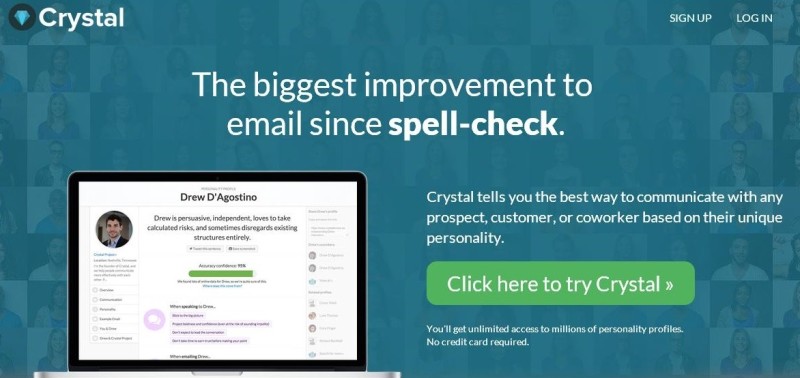
Crystal Knows, Digital Footprints, and Personalized Learning
On the podcast, one of the individuals Manoush interviews mentions that a similar proprietary personal detection technology is used by some banks to determine whether or not to give an individual mortgage. Manoush observes that
"every footprint we leave online is like a note in a dossier about us."This is yet another great example of why we all need to leave positive footprints online and think before we digitize anything. When I speak to students about this, I always tell them to only post things their grandma would approve.
Cyrstal Knows is using information it finds to automatically determine an individual's personality. I'm sure it will only be a matter of time before there are other programs out that that will determine an individual's likely success in a college for admissions, employability for an HR department, or determine our medical and life insurance rates based on our profiles- where we eat, what our friends do, etc. Of course, all of this probably exists and is already in use, I just haven't heard of it yet!
They discuss how this sort of technology can be creepy to some, as well as whether or not an individual using Crystal Knows should be required to disclose this fact to a recipient. These are certainly intriguing questions to ponder...
I'm optimistic that as more algorithms are created to categorize humans in all areas, we will better be able to personalize learning in education, too. The more a computer knows about an individual, the better it can target and tailor the instruction to each specific learner. Already we have the seen the benefits of tutoring programs that can adjust the level of the content and questions to each individual learner. I'm sure that programs like Crystal Knows can also be used to aid the method of instructional delivery to better know how to reach and encourage each student. It will be exciting to see the next tech thing in this area!
Monday, May 25, 2015
School's (Almost) Out, So Keep Your iPad for the Summer
This year, rather than collecting iPads from our current 4,500 students, we decided to have them hang on to their iPads for the summer. Last summer we changed mobile device management systems and therefore needed to touch every iPad. This year, we have no reason to collect every device. We recently added an enterprise web content filter on student iPads that offers the same level of filtering off campus as students have at school. After reviewing all the ways our students could use their iPad for learning over the summer, it made the most sense to allow students to keep them.
We will only be collecting the iPads of our 750 graduating seniors. Those four year old iPad2s will be reused for a fifth year in a row by next year's grade five students. We have been very pleased with the functionality of these iPad2s, originally planning to just get three years of use out of them.
Next year our iPad one-to-one program will expand again and cover all 6,000 students in grades 5-12. (Related: Tip #1 for a Successful 1:1 Implementation: Execute the Rollout Carefully and Deliberately and more about Minnetonka's 1:1 iPad Program) Below is the letter about keeping iPads for the summer that was sent home to all grade 7-11 parents last week:
-----
As the school year comes to a close, we want to let you know that students will keep their iPads over the summer. We have reached this decision after considering the many opportunities students now have for learning: reading eBooks, taking Tonka Online classes, reviewing materials and practicing skills learned this year, further investigating academic interests, and exploring and creating projects based on personal interests. Opportunities for learning over the summer abound, and we believe the iPad is an effective tool our students can use to take advantage of these opportunities. Please also note that internet content filtering has recently been installed on student iPads that offers the same level of filtering off campus as students have at school.
In preparation for next year, there are four important items that need your attention.
1. All iPads will be inspected before summer to assess damage. Any fines will be listed in your child’s account. Should an iPad need repair during the summer, it should be brought to the school office where your student will attend next year as soon as possible. Please do not wait until the end of summer or it may not be able to be repaired by the first day of school.
2. Optional insurance coverage for currently insured iPads will be extended through September 7, 2015 at no additional premium. If you plan to renew your insurance coverage for next school year, you may pay the $40 annual fee online for uninterrupted coverage that begins on September 8, 2015. If you are not currently covered and wish to purchase insurance, your child must have her/his iPad inspected by Media Staff before the $40 fee will be added to your child’s account and coverage will begin. Payment Directions
3. Your child should bring her/his iPad ready to go and fully charged for learning on the first day of school, September 8, 2015. Like pencils, paper, and folders, the iPad has become an essential tool for school, and your child's teachers are planning activities and lessons on the first day of school that will help your child be organized and successful with the iPad.
4. Continue to talk with your child about digital citizenship and appropriate use of the iPad. While no filter is 100% effective, having the District’s filter on your child’s school iPad helps. For devices at home and personal cellular devices, we strongly recommend installing filters. As a friendly reminder, we encourage regular family conversations with your teen about digital citizenship, care and use of the iPad, and a focus on educational use. Please consider a Media Use Parent-Teen Agreement from Common Sense Media to begin conversations with your child.
Thank you for your attention to these important items. We hope your child has a summer filled with adventure, exploration, and learning!
Sincerely,
The Minnetonka Teaching & Learning and Technology Departments
-----
Other related posts:
-----
Other related posts:
- Tip #1 for a Successful 1:1 Implementation: Execute the Rollout Carefully and Deliberately
- Tip #2 for a Successful 1:1 Implementation: Differentiate Teacher Training
- Tip #3 for a Successful 1:1 Implementation: Use Schoology as the Classroom Hub
- Tip #4- Make Full Use of the iPad as a Formative Assessment Tool
- Great 1:1 Program Evaluation Questions for Student, Parent, and Teacher Surveys
- More about Minnetonka's 1:1 iPad Program
Monday, May 18, 2015
KARE 11 News: Helping Kids Make Good Digital Decisions
This morning I had the opportunity to be on KARE11 News as part of a story Helping Kids Make Good Digital Decisions. The story featured four interviews with Boua Xiong from KARE 11, Minnetonka Public Schools parents and their children, and me. We discussed a wide range of topics including what age is appropriate to get a cellphone, filtering and monitoring tools available, social media, and digital footprints. I am so thankful for the opportunity to share tips and resources with so many people. I was on hand in the studio to do a live Facebook chat for people commenting on the story and asking questions. The reach of a televised new story is quite amazing to me. By 7:30am, over 24,000 people had viewed the story on Facebook. Fortunately not all of them had questions!
During one of the four video segments, Cade, a fifth grade student, mentions how students in Minnetonka learn to T.H.I.N.K. before they digitize. He brought it up on his own during the interview and recited the whole acronym from memory. It was great and is evidence that the work the media specialists and teachers are doing to educate our students is really sticking!
Digital Citizenship starts with education, but it shouldn't end there. Technology provides us with a means to limit the exposure to inappropriate material that reaches our kids' screens. I also talked about the Curbi filtering app (more detail in a previous post) and shared my list of resources with viewers and the online audience.
This weekend 500+ people signed my online petition to Urge Cellular Carriers to Provide Parents with Content Filters on 4G LTE. I hope to continue the momentum around this issue and get the attention of Verizon and other carriers. Please join me in encouraging the development of tools to protect children.
Labels:
4G LTE,
Android,
Apple,
Apps,
AT & T,
Balance,
Change.org,
Curbi,
Cyber Safety,
Digital Citizenship,
Filter,
iPad,
iPhone,
iPod,
KARE11,
Monitor,
Restrictions,
Screen Time,
smartphone,
Verizon
Monday, May 11, 2015
Petition to Urge Cellular Carriers to Provide Parents with Content Filters on 4G LTE
You’ve probably heard the advertisements from Verizon that parents who purchase cell phones for their children are offered content filters to protect children from pornography, drugs, alcohol and other inappropriate content. But WAIT. If you provide your child with a smartphone on 4G...no such filter exists through your wireless carrier.
| Verizon's Advertised Free Content Filters "Set boundaries to help ensure your kids can view only age appropriate content from their wireless device." |
Many parents today ‘hand-down’ smartphones to their children when the parent upgrades their device. Doing so provides full, unfiltered access to the internet through cellular carriers. The carriers recognize the need to provide safeguards for youth and do so on 3G devices. In fact, they have undoubtedly spent thousands advertising these parental controls for parents, but only make them available on older technology models.
Cell carriers need to keep opt-in content filters up to date with all models of devices available and used by children today. Even better, carriers could collect the birth year of the individual using the account and match the age appropriate content allowed to the device with the age levels they already have established.
Too many parents are unknowingly providing an on-ramp to developmentally inappropriate content by purchasing a smartphone for a minor, only to discover that advertised content filters don’t work on 4G devices.
Labels:
4G LTE,
Android,
AT & T,
Cell Phones,
Change.org,
Cyber Safety,
development,
Digital Citizenship,
Filter,
Filters,
iPhone,
Monitor,
Parenting,
Petition,
smartphone,
Sprint,
T Mobile,
Verizon
Subscribe to:
Posts (Atom)