Monday, July 13, 2015

Back to the Future Part I: 2005 Technology Staff Development Classes- the Beginning of Minnetonka's Digital Curriculum

I love the concept of time travel, whether it is a book or movie. Recently my wife and I watched Back to the Future and Back to the Future III to our kids, both really fun movies to see which our kids enjoyed. (Sorry, we're not Part II fans.)  And just a couple of days ago I saw a DeLorean drive by, so Doc and Marty were on my mind as I came across a sheet of paper from my past and wrote this. So...feel free to press play on Back in Time by Huey Lewis and the News (one of my favorite pop 80's bands) as you read the rest of this:

I started working as an elementary fourth and fifth grade teacher in Minnetonka 20 years ago. After four years at elementary, I moved to one of our middle schools and spent four years teaching there. Then, twelve years ago I was hired as our District's first Technology Integration Specialist. We had just started with SMARTBoards in our classrooms back in 2002. As one of the first teachers in Minnetonka who had used a SMARTBoard and then left the classroom to train colleagues, I spent a lot of time helping colleagues with SMART Notebook software and learning to add technology to their lessons. We actually didn't have a lot of projectors in classrooms at the time, so when we added SMARTBoards it was also the first time those teachers had the opportunity to project their computer, a PowerPoint, or display an Internet page for their students. Over the next five years or so, we added an interactive whiteboard, projector, and sound field to all of our 600+ classrooms. Some more videos about that can be found hereThis began the digitizing of our curriculum. 

In about 2004 or 2005 I started offering technology training to teachers in August prior to the start of the school year. I didn't think I had any record of those earliest classes that until my wife found the sheet of paper pictured below at home in a stack of recycled/scrap paper now used by our kids for coloring:  


Technology tools in 2005 for our teachers were SMARTBoards, Inspiration and Kidspiration Concept Mapping Software, Blackboard, Windows Movie Maker (with digital cameras using a 3.5" floppy disk), and United Streaming videos. It's pretty amazing to think back and reflect on how far things have come. For example, we often forget how much work it was in 2005 to make a digital movie and take for granted that we can just do this all on our phones now. 

It is also good to see that even ten years ago, we were focusing on more than just the tech tool itself. In the descriptions on the page, there are phrases like use "technology to foster inquiry in student learning", encouraging teachers to have students use technology for projects such as a "narrated movie or animated short video," and to use technology to "deepen students' understanding," all things we are still working on today. The tools have certainly changed but the underlying principals of technology integration and staff development have not.

It will be fun to see what the future holds in regards to technology staff development. Another ten years from now, I would hope we are still working on fostering inquiry, having students use technology, and deepening understanding. Maybe if I was a bigger Part II fan I could just go with Marty and visit the future today. Nah, I guess I'll just have to wait and see.

Monday, July 6, 2015

A Big Bang for Your Buck: The iPad for $0.38/day: Less than a Chromebook

[Update one year after this post: we sold our iPad2s back to a vendor and use the revenue toward purchasing new devices, bringing the total cost for an iPad per student per school day down to $0.38! More on that here.]

Five years ago when we started our iPad 1:1 program, we were anticipating that an iPad would last three years. The device itself was so new no one really knew how long it would hold up. At the time iPads were introduced, people worried that a mobile tablet device with glass in the hands of children in a classroom would not last. They also worried about how long the inner parts and pieces would function.

We were very pleased last month to finish a fourth year with our original batch of 16GB iPad2s, and even more pleased to be able to use them once again this coming school year, getting a fifth year of use out of these iPads. These iPads have continued to function well, allowing students to annotate digital work, create iMovies, and so much more. At WWDC a few weeks ago it was announced that iOS9 will work on our five year old iPads, too, still allowing our students to have the latest functionality needed for learning.
Image Source

An iPad with case costs us about $400.  If you divide that out over five years, you end up with a cost of only $0.44/day! That's less than one Starbuck's medium cup of coffee a week!


$400 ÷ 5 years ÷ 180 school days = $0.44


I realize there are other costs for a 1:1 program, too: some apps cost money, but we are able to keep those year to year regardless of the device. Our mobile device management system has an annual license fee, but that only increases the cost per day a few cents per year. But licensing costs as well as infrastructure and staffing support expenditures come with any device whether it is laptops, Chromebooks, or iPads. 

We have considered reselling our iPads after a few years of use, too, as they do maintain quite a value, but so far have not. It’s an intriguing option, but when considering this, be sure to factor in the hours needed for collecting and redistributing devices, helping thousands of kids with re-set up, etc.  This is not something we have been interested in at this time.  In fact, we had our students keep their iPad this summer and saved ourselves a lot of time.

Colleagues in other school districts with Chromebook implementations have told me about the difficulty they have had finding a well-built device that will hold up to classroom use.  They have had bad luck with the inexpensive models they purchased. We just purchased some Chromebooks for about $260 apiece including the annual device management license (which is much more expensive than our iOS MDM). We are anticipating that these Chromebooks will last  three years. If that turns out to be true, then our Chromebook cost per day will be $0.48, meaning our iPads are actually less expensive than Chromebooks. If the Chromebooks last longer than three years, the costs will be less. But three years from now our iPads could be eight years old and still working, bringing that overall cost down as well... 

Next year we are adding grade five and six students to our 1:1 program, so we will be 1:1 in grades 5-12. A few weeks ago we collected the iPads of our graduating seniors. Those four year old 16GB iPad2s will be redistributed to our fifth grade students in September. Last week we received a delivery of iPad 32GB Airs for this year's grade six students (pictured). If those iPads last as long as our first batch, our current seventh graders will turn them in when they graduate five years from now in 2021.  

Perhaps we will be able to use our iPad2s for more than five years, bringing the total cost down to even less, who knows?  The iPad has turned out to be a great device not only in terms of instruction, but also as a great choice for maximizing the return on our investment.  

Other posts related to iPads

More about Minnetonka's 1:1 iPad Program

Monday, June 29, 2015

10 Days Without Email- Only 20% Matters

In my continued efforts to cut back on digital distractions (see my 2015 New Year's Resolution and other past related posts), I recently had the opportunity to step away from my work email. I was on vacation for six work days, so I turned off work email on my devices and didn't open it until this morning. It's a simple as going to your settings for email as pictured and turning off the specific email account(s). I know some people even do this on the weekends. I haven't yet. I think turning off email and alerts on weekends/holidays would be a nice added feature in a future operating system.

In the past I've wondered how much email is truly important and needs my attention. This brief hiatus actually gave me the opportunity to tally up my inbox and discover that 20% of my emails really required my attention (31/157=19.7%). Below are the details.

If teachers and students were in school right now I realize that these numbers would look different. Also, my colleagues knew I was gone and didn't send me messages. I know I'd have more emails that mattered and required action/attention if I had run these numbers in September instead of the end of June. But I also know I would have received even more sales spam, newsletters, and would have been cc'd on many more messages. So perhaps the overall totals would all increase but the percent that truly matter wouldn't change much.  

As I look to ways to decrease distractions, I'm thinking of unsubscribing to even more newsletters and bloggers. I want to stay on top of some things and be aware of news and events, but each time these hit my inbox they become a potential distraction. I'm also considering setting up email-free times to focus because I know that even reading the subject line of a message takes away my attention from the tasks at hand. Knowing now that only 20% of the emails I receive really matter will help make this easier to do.

*Spam numbers listed only include emails that made it to my inbox. A review of our school's spam filter shows that I 
received an average of ten additional messages per day over the last week, bringing my total to an additional 100 emails if I were to include those. 

Monday, June 15, 2015

Coming Soon: MiPhone X with a Conscience Helps You T.H.I.N.K. Before You Post

MiPhone X with a Conscience
Helps You T.H.I.N.K. Before You Post

We're fortunate in Minnetonka to have very talented and creative staff and students. One of these individuals, Andy Smith, is our A/V Production Specialist. Part of his job is to produce messages for the high school morning news show, including messages around Digital Citizenship. His most recent creation to get our students to T.H.I.N.K. Before They Post is about the 
MiPhone.  The MiPhone is a futurist smartphone with a conscience that helps with posting appropriately and keeps its owner from getting into trouble or having digital regret.  The video does a great job of getting students to reflect on what they digitize and communicate in a humorous way.

The video first appeared on the high school morning news show at the beginning of June 2015.  The Beyond 140 series is a regular feature of the high school principal, Jeff Erickson, who with Andy's help, uses video to deliver messages to the 3,000 Minnetonka High School Students that go beyond the limitations of 140 characters of his Tweets. The student actor in the video is Eric V., a talented senior who just graduated. 

Find more resources about Digital Citizenship here.

Monday, June 8, 2015

Managing Change- Stakeholder Communication Matrix: Level of Initiative Support & Ability to Influence Success

Although the need for support on a project is obvious, meeting the needs of each stakeholder group and understanding the important part each person/group plays may get overlooked. Last week I was part of an EdCamp with our Teacher Instructional Coaches and Instructional Technology Staff. It was a great opportunity to get together with colleagues and share ideas on topics of like interest, teaching and learning from one another.

One of the things discussed was the Stakeholder Communication Matrix pictured. A colleague had us work in small groups to think of a project we were currently working on that involves a big change, and then list all of the people and groups that were part of this change. For example, the small group I was with focused on the expansion of our 1:1 iPad program in Minnetonka to grade five classrooms at our elementary schools next year. We will then use iPads 1:1 with all 6,000 grade 5-12 students this fall.

We listed all the different groups involved in this project on a separate Post-It Note, such as the teachers, parents, students, administrators, school board, tech department, media specialists, instructional technology staff, and even the custodians. We then placed each Post-It Note on a quadrant on the chart pictured. On the X-axis, we rated each person or group from low to high on the level of support they would provide the project. We did the same on the Y-axis, plotting their ability to influence success of the project from low to high. 

As we considered each individual and/group, I found the conversations extremely beneficial. It was also a great reminder of the importance of taking time to step back from any project and consider how all people are affected by it, the roles each person/group plays, as well as what you should do as project leaders to keep everyone informed, engaged and satisfied. 

Today is the last day of school for students, and this summer there will be a lot of work we do to get things ready for next year. Even though we're just finishing up the fourth year of our program and things seem to be running smoothly, taking time to do this prior to the start of that work will help things go even better in the fall.

Monday, June 1, 2015

Crystal Knows, Digital Footprints, and Personalized Learning

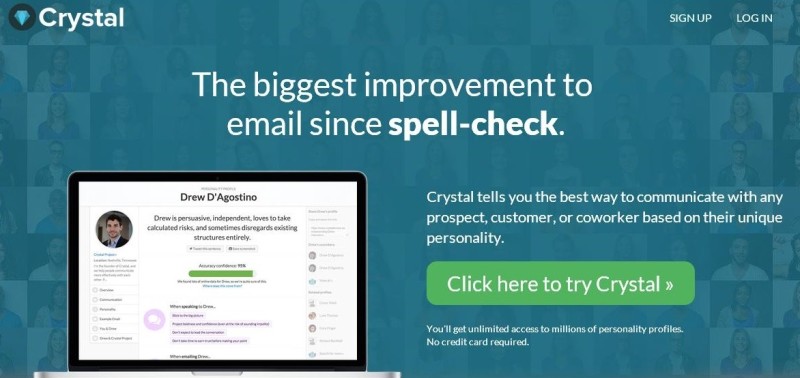
Last week on WNYC's Note to Self podcast (Formerly the New Tech City Podcast), host Manoush Zomorodi focused on a service called Crystal Knows, which I found pretty fascinating. Crystal Knows is an email "coach" that (who?) gives you suggestions on how to best respond to an individual based on their personality type. It determines this by scanning the Internet to look at public profiles and other online content. It then uses algorithms to determine that individual's personality type. This data is then shown to you as you are composing your email, and Crystal also coaches you as you write your response, letting you know whether or not your email is being written in the best possible way to have the biggest impact, make the sale, get your point across, etc.   

On the podcast, one of the individuals Manoush interviews mentions that a similar proprietary personal detection technology is used by some banks to determine whether or not to give an individual mortgage. Manoush observes that 
"every footprint we leave online is like a note in a dossier about us." 
This is yet another great example of why we all need to leave positive footprints online and think before we digitize anything.  When I speak to students about this, I always tell them to only post things their grandma would approve.  

Cyrstal Knows is using information it finds to automatically determine an individual's personality.  I'm sure it will only be a matter of time before there are other programs out that that will determine an individual's likely success in a college for admissions, employability for an HR department, or determine our medical and life insurance rates based on our profiles- where we eat, what our friends do, etc. Of course, all of this probably exists and is already in use, I just haven't heard of it yet!

They discuss how this sort of technology can be creepy to some, as well as whether or not an individual using Crystal Knows should be required to disclose this fact to a recipient. These are certainly intriguing questions to ponder... 

I'm optimistic that as more algorithms are created to categorize humans in all areas, we will better be able to personalize learning in education, too. The more a computer knows about an individual, the better it can target and tailor the instruction to each specific learner.  Already we have the seen the benefits of tutoring programs that can adjust the level of the content and questions to each individual learner.  I'm sure that programs like Crystal Knows can also be used to aid the method of instructional delivery to better know how to reach and encourage each student. It will be exciting to see the next tech thing in this area!