Monday, March 28, 2016

Best Age for a Kid to Get a Cellphone with Internet Access

February 2016 Grade 5-12 Parent Survey
One of the most frequent questions I get asked when I speak around Minnesota with parents about kids and technology is, "What's the best age for a kid to get a cellphone with Internet access?" Last month, we randomly sampled our grade 5-12 students' parents and asked this very question. 528 parents completed the survey.

Almost one fourth (23.3%) of parents think that waiting until high school (grade 9-12) is best.


One third of parents believe that Grade 6 is the appropriate time for students to start having a cellphone with Internet access; 62% overall think middle school is when to start (grade 6-8).


Only 13.6% believe that it is appropriate for elementary students to have a cellphone with Internet access.
Less than 1% (0.8%) believe it is not appropriate.
This topic/question has changed over the past 10 years. It used to be the kids would get cell phone that could make calls and parents would ask me when their child should have text messaging, too. Some parents still began by getting their child a simple phone with just a text messaging plan, but many parents today skip this altogether and their child just starts with a smartphone with full Internet access. Often times the phone is a hand-me-down from a parent or older sibling.

Nearly one third (31.3%) of parents have a filter on their child's cell phone that blocks inappropriate content.

February 2016 Grade 5-12 Parent Survey
Before giving that first phone with internet access to a child or teen, parents would be well-served to pause and intentionally plan for safety. Providing any cellular data plan means giving your child the keys to unfiltered internet access--the good, the bad and the dangerous content of the world wide web. Most parents would agree: Kids shouldn't have unfiltered access to the internet. Personally, my kids received a phone with filtered internet access when they turned 12. We use and I have recommended Curbi in previous posts. I'm willing to pay $7/month for the comfort and peace of mind in knowing that my child's connection to the Internet on their personal device is filtered. Parents of younger children with smartphones may want to consider the built-in web filtering options of Restrictions right in the Apple iPhone or Android device for free, but this often blocks so much content that older students won't like it and complain. Restrictions was the most common solution listed by parents in our survey when we asked them what product they used for a smartphone filter.

“Everybody has one.”
“Everyone else has....” Perhaps the most persuasive words in the English language, “everyone else” has been the rallying cry for children trying to convince their parents to allow something for decades. Your child may tell you that they are the only one without a cellphone or perhaps without an iPhone. S/he may state that everyone but her/him has Internet access. Or perhaps your child says that no one else's parents have put a filter on their smartphone. This data proves that is not the case; even some upperclassmen don't have phones with Internet access, and of those that do, many are filtered. 

Related posts: 

Monday, March 21, 2016

86+ Day Facebook Fast: You're either busy living or busy dying.

Christmas was 86 days ago. So was the last time I posted to Facebook. I was never a frequent poster in the first place, but I did look at what others posted almost daily. Not only have I not posted for 86 days, but I've also not looked at what everyone else has been updating. 

Facebook offers us the unique opportunity to connect with family and friends, many of whom we haven't seen in a long time. However, although I do enjoy seeing what my friends and family are up to, I wish there was some hierarchy of news and posts which would allow me to see only the most important updates in their lives when I log in. If there were a cap in the amount of content a person could post to a social network, I'd join it. I'd like to view things closer to the importance level of events shared in annual Christmas letters sent by snail mail in the past than the situation I found myself in before starting my fast: sifting through hundreds of posts, including check-ins from restaurants and pictures of daily events that wouldn't normally even make a verbal recap of the day. All this was in an effort to keep tabs on important events in the lives of my friends and family. 

I suppose this sounds selfish or like I don't care, but what I really wish for is a realistic balance. As I've written about in the past, I have been monitoring my techcognition: the amount of time I spend using technology, time I am distracted by it, and time I'm not mentally present with those around me due to looking at news feeds, sports scores, social networks, texts, and emails. Last year I began to realize just how much time I was spending looking a Facebook and in many cases, a lot of trivial information from people whom I wasn't super close to and/or hadn't seen for years, sometimes decades. Facebook had become a time drain for me, and fed into FOMO.  

Image Source
Without completely blocking the news updates from someone, I don't know of a way to narrow this amount down and not miss something really important. I can't envision a company like Facebook wanting to create something that wouldn't be viewed as frequently or for as much time, so I doubt this will happen, but maybe some sort of grassroots social network will evolve soon. Until then, I've opted to just stay out of it. Facebook kind of reminds me of a prison where you are just spending time. This in turn makes me think of one of my favorite films, Shawshank Redemption, when character Andy Dufresne said to fellow inmate Red: 
"Life comes down to a simple choice: You're either busy living or busy dying."
I can honestly say I don't miss Facebook. I may end up checking it a few times a year. But as far as daily or even weekly log ins, I'm going to spend more time living with my family and friends in person. And I'm going to help my kids see the benefits of living this way to. My daughter tells me it's a social faux pas to post to Instagram more than once a week, so maybe our kids are learning this balance already. Less FOMO and more JOMO

If you haven't seen Prince EA's "Can We Auto Correct Humanity" video above, please make time for it. Check out the past episodes of Infomania from one of my favorite podcasts, Note to Self, too. I made a couple of brief appearances on those episodes related to this very topic.

Related posts: 

Monday, March 14, 2016

Google Expeditions Pioneer Program Visits Minnetonka Schools

Middle School East 7th Graders on a Google Expedition
On Friday, the Google Expeditions Pioneer Program came to Minnetonka Middle School East seventh grade science classrooms. Technology Instructional Coach and seventh grade social studies teacher Carson Hoeft signed up for the program last fall and recently learned that the school was selected to be a site to try out the new technology. If you aren't familiar with Google Cardboard, check out a previous post for an overview: Google Cardboard- Virtual Reality in the Classroom.
The Google Expeditions Program brings a class set of Google Cardboard viewers along with Droid devices preloaded with virtual environments. The teachers can select what they wish for their students to visit. For Friday's virtual field trip, students traveled to Borneo to visit the beaches, jungle, and scuba dive off the coast. 

The content includes information about the locations for the teacher who is a virtual guide for their students as they view things through the Cardboard viewers. The teacher uses a droid tablet to view the same content, and has the ability to pause the images, see a floating icon for each student to determine where everyone is looking, and can tap the tablet to make an arrow appear on the students' screens in order to direct attention to a specific location. 

The students were so excited about the experience. It was great to be present for their initial reactions (oohs and ahs, Wow! Cool!) when they began. In a way I felt like I was glimpsing the future of classrooms to come. I can imagine so many possibilities and so much content becoming available for teachers to engage their students. I can foresee a time when the students don't just have this as a one time event but a daily experience. Eventually students could have their own device to regularly walk across a battlefield with their history class or be virtually present during an important speech. I can also imagine it won't be long before the content is not just static 360 degree images but moving interactive video immersing us in an environment where we can interact with others. Wow!

Here is some additional information from Google about the program:

  • The Wildlife Conservation Society, PBS, the American Museum of Natural History, the Planetary Society, and the Palace of Versailles contributed to developing the curriculum for students.
  • These trips are collections of virtual reality panoramas — 360° photo spheres, 3D images and video, ambient sounds — annotated with details, points of interest, and questions that make them easy to integrate into curriculum already used in schools.
  • While nothing replaces hopping on the bus for a field trip, Expeditions provide an unparalleled opportunity for supplemental learning. Seeing the brilliant ways teachers integrate VR in their classes has taught us so much already.

About Google Cardboard viewer:

  • Google Cardboard is a virtual reality viewer made almost entirely of actual cardboard. Cardboard allows anyone with a modern smartphone to experience virtual reality. There have been more than 5 million Cardboard viewers shipped.

Monday, March 7, 2016

Video & Resources from Annual Minnetonka District Tour: Deeper Learning in the 21st Century


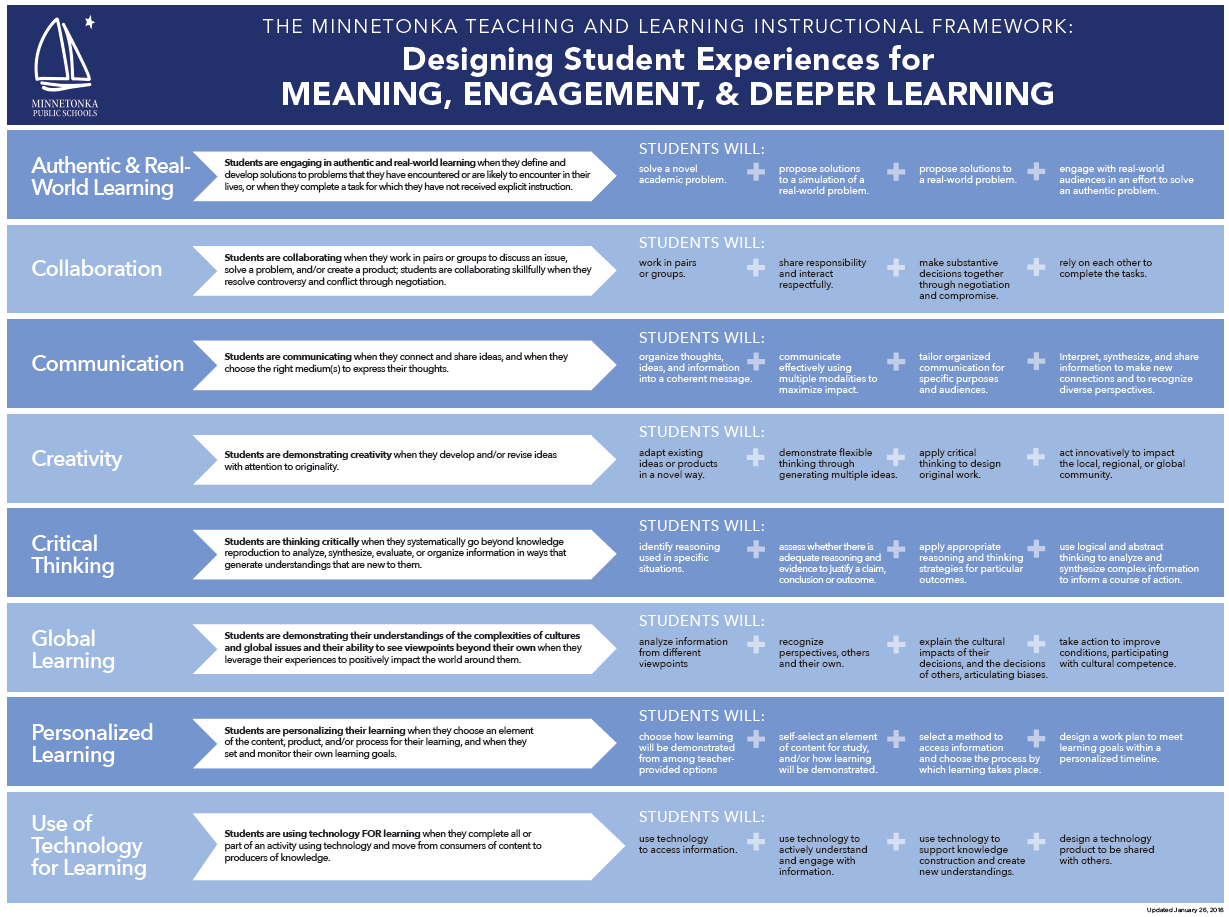
Minnetonka Teaching & Learning Instructional Framework
The 11th Annual Minnetonka District Tour: Deeper Learning in the 21st Century last week was a great success! We had 150 visitors from as far away as California, Texas, and Costa Rica come to Minnesota. They toured classrooms and attended sessions at Groveland Elementary, Minnetonka Community Education Center, Minnetonka High School, Minnetonka Middle School EastScenic Heights Elementary, and Vantage. (Open any of those links to see the site tour details and content.) We heard great things from attendees who appreciated learning about all areas of teaching and learning with this year’s focus not just on technology but on our Framework. The Minnetonka Teaching and Learning Instructional Framework is the lens through which teachers and administrators design student experiences for meaning, engagement, and deeper learning.
You can view some Twitter photos and comments from the two days in the Storify below. The full agenda and program includes links to 35 presentations during breakout sessions. Even if you weren't able to attend, you can read the descriptions of the sessions as well as open links to view any of the presentations. Topics included authentic and real-world learning, collaboration, communication, creativity, critical thinking, global perspectives, personalized learning, use of technology, and much more!

Monday, February 29, 2016

Easy Ways for Parents to Keep Tech Use Positive- Teacher Conferences Handout

Last spring, Deephaven Elementary Fifth Grade teachers piloted using spring conferences as an educational opportunity to talk with parents about cyber-safety in conjunction with our digital literacy curriculum. The face-to-face conversation was more beneficial than sending out an email or simply sending this information home in backpacks. 

Link to PDF
This year we expanded this practice to all of our elementary schools.  We had a one-page flier of easy ways parents can help their children with technology which we printed and teachers handed to parents at conferences. Teachers were encouraged to take a minute for a personal conversation with parents about the importance of proactively protecting children online.

Spring of fifth grade is a crucial transition stage of children’s lives. We want to encourage parents to do three things:  1) Talk to their children about ethical use of personal devices and 2) install filters on home WiFi and 3) use restrictions on devices. We suggested to teachers that if they had personal experience about the benefits of using the tools listed in the handout that they would share these with their students’ parents.

Our District Digital Health & Wellness Committee has a goal of getting more 
parents to use restrictions and filters to protect children from inappropriate content in a mobile world. We’ve learned that many parents have never considered the possibility of their child accessing porn or other material on personal devices. They assume all devices are filtered, like our school filters the internet, and that is not the case unless parents take responsibility for turning on filters and restrictions.
64% filter home WiFi
We started surveying all parents two weeks ago about technology and included filter related questions. Of the fifth grade parents who have responded so far, 64% stated they have a filter on their home Wifi and 63% have a filter on their child’s smartphone if s/he has one. We will be doing a post survey of 5th grade parents after conferences and are hoping for an increase in numbers after the teachers' conversations with families. 


Related posts: 

Monday, February 22, 2016

Stop Digging Yourself a Bigger Hole & Get Stuff Organized with Things

"If you find yourself in a hole, stop digging." 
 -Will Rogers 
Things Interface. Image Source
For the past month I've been using Cultured Code's Things program for keeping track of tasks and stuff I want to remember.  I really liked it and have found it to be very helpful. As I've written about before, I find myself becoming more and more forgetful with and ever growing amount of information. (See Dementia of the Preoccupied) It seems I have all sorts of things I want to remember and ideas, questions, and to-do items that pop into my head at inopportune moments, and if I don't make a note of them, I will forget.
I've tried numerous systems over the years, everything from digital notes and Post-Its, the Reminders app on my phone, and other programs similar to Things. Most often I'd just send myself an email, resulting in an ever growing inbox of unorganized items that could not be sorted by importance or categorized. This resulted in major inefficiencies of re-reading the same items and missing important items that were buried. I was digging myself into a bigger hole. Things has changed this.

One of the best things about Things is the fact that it works across all my devices. The app is on my iPhone, iPad and also my Mac. Any item I add syncs across all of these locations. It sounds simple, but is wonderful. Thoughts occur anywhere; access to your lists and tasks should mirror this. It also integrates with Siri, which is super helpful. Anytime I think of something I don't want to forget, I only need to tell Siri to "Remind me to..." and the item is added to Things. I love the convenience of this compared to my past inefficient systems. 
The four buckets in Things. Image from Things.
The features within Things program itself make it so much better than just using the iPhone's Reminders app or Notes. Each item that you add can be categorized in one of four buckets:
  1. Something that needs to be done Today
  2. Items that are Next
  3. Scheduled Items you assign a due date
  4. Items that can be put into a Someday bucket
There are many other features in the program, most of which I haven't even tried out yet. The interface is simple and it was easy to get started. It has a two week trial period, which is a great way to get started. The week I bought the program it was half off the $50 retail price which was a nice plus. 

I first heard about Things in December at the TIES Conference from Mark Wallace. Mark's presentation was entitled, "Redeeming Time: Finding Freedom from Overload" and was one of the best I attended. Mark shared the Will Rogers quote above and it fit my current lack of an effective system. He also mentioned the book Margin: Restoring Emotional, Physical, Financial, and Time Reserves to Overloaded Lives by Richard Swenson which I had read and liked, so I was hooked. (See a previous post on Crazy Busy: You Are Letting the Screen Strangle Your Soul.) 

Mark talked about the "stuff generators" in our lives: email, social media, family, students, home. He pointed out that research has proven we can only hold four to seven things in our short term memories. Capturing and offloading it into the least amount of places is therefore necessary. Then we need to clarify and organizing our stuff into actions and outcomes, which you can do with Things. I am thankful I was at his presentation and saw this solution. Hopefully you find it beneficial, too.

Monday, February 15, 2016

Mt. Rushmore 2- Beyond Four Presidents

Nicky's recommendation for Mt. Rushmore 2
 
Happy Presidents' Day! It seemed fitting that today's post feature a project related to the holiday: 

Minnetonka Middle School West seventh grade social studies teacher Mo Berkowitz had her students imagine they had to persuade a committee deciding who the four new individuals on a second Mount Rushmore should be. Students had to use what they had learned about United States history to choose the four most important people to nominate for the new memorial. Students were encouraged to select individuals who best represented the diverse range of people in our country. Students need to research the individuals who they selected for this memorial to document their research using at least three sources. Then they scripted and created a presentation to show to the committee using a variety of iPad apps.


One student, Nicholas,  selected John F. Kennedy, Thomas Edison, Rosa Parks, and Ben Franklin for his nominees. "Nicky" used his iPad to create his presentation, and app smashed Pic Collage, Chatter Pix Kids, and Thing Link. After finding images of the four individuals he selected, he used PicCollage to overlay them on an image of Mount Rushmore and then exported this to his camera roll on is iPad. Then, in Chatter Pix Kids he used the individual images and recorded himself as scripted. He then exported this to the camera roll as well. Finally, Nicky used ThingLink to combine his proposed Mount Rushmore image and Chatter Pix videos together into the final product. You can listen to his project by clicking on it above. 

The instructions from Mo for the project are below. She also has shared her rubric, the templates for the students' research, and the instructions she provided for students to complete the app smash. Mo worked with Minnetonka Middle School East seventh grade social studies teacher Bev Antilley on the writing and planning for this project. This is a great student project that incorporates critical thinking, communication, creativity, use of technology, and allows for personalized choice in learning. 


A few weeks ago I highlighted another presidential themed assignment, App Smashed Presidential Rock Bands as Alternative Assessments in US History