Monday, October 31, 2016

Minnetonka Hosting The Minnesota Conference Featuring Apple Teacher February 4, 2017

Minnetonka Public Schools is excited to be hosting the annual Minnesota Conference Featuring Apple Teacher on Saturday, February 4, 2017, at Minnetonka High School. This full-day conference features an inspiring keynote, world-class spotlight speakers, and local success stories. Participants choose from a full range of hands-on breakout sessions for various grades, subject areas, and skill levels. A complete strand of sessions will be available to introduce participants to the Apple Teacher Learning Center and support them in their efforts to earn the badges necessary to achieve Apple Teacher recognition. Additional sessions include popular topics such as editing video with iMovie, coding with Swift Playgrounds, visual storytelling, green screening, publishing, and much more. These sessions go beyond “how-to” workshops focusing also on meaningful application with students. 

The conference offers an opportunity to connect with a community of like-minded educators. Attendees share resources and answer each others’ questions – and also have easy access to the expertise of presenters from around the world. All participants are also invited to join EdTechTeam’s Facebook Community for Apple Teachers, where members receive ongoing support to continue their learning, earn their badges, and achieve recognition as an Apple Teacher. A photo booth, technology sandbox, and fun collaborative activities allow for an individualized experience at the conference. A continental breakfast and catered lunch are provided, along with conference swag and opportunities to earn additional prizes.

I hope you will join us! Early bird registration lasts until December 4, 2016. Registration, schedule, and further details. 


Related Posts:

Monday, October 24, 2016

Classroom 1:1 Technology Norms: Responsibility, Respect, Focus & Presence

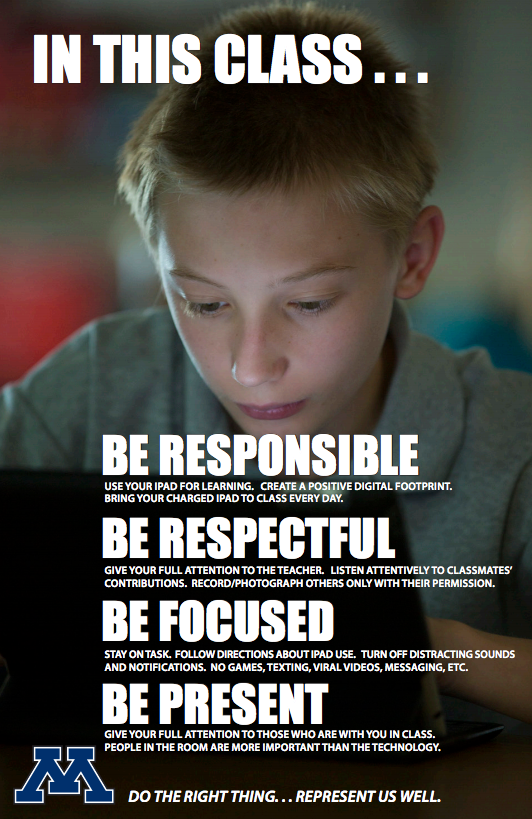
Setting norms is a helpful exercise for a productive meeting. Norms in the classroom are beneficial, too. As part of our 1:1 program, we have made classroom management a continuous focus (see Tip #5 for a Successful 1:1 Implementation). This is the fifth year we have had "iPad Norm" posters in all of our grade 5-12 1:1 classrooms as part of this continual focus, which provide teachers and students with common language and expectations around using technology for learning. Teachers revisit these norms throughout the year and when necessary, can reference them listed right on the poster hanging on the wall.

Five years ago, high school media specialist Peter Gausmann and instructional technology coach Ben Stanerson drafted these norms with our teachers. (Our 1:1 program began with freshman at our high school six years ago with and was carefully and deliberately rolled out to middle and elementary grades in the years since.) We combined them with photos of our elementary, middle, and high school students using technology and created posters like those shown. Teachers were asked to hang the poster in their classrooms and talk through the points of the poster with students.

At the time, Peter explained to our teachers that "a growing body of work (by Dr. David Walsh and others) stresses the importance of teaching kids how to use technology for learning and how to handle distractions from mobile technologies.  Our goal is to provide all staff with common language and talking points that you can use with students and parents." 

The five norms are:
Be Responsible 
Use your device for learning. Create a positive digital footprint. Bring your charged device to class every day.   
Be Respectful  
Give your full attention to the teacher and other students when they are talking. Listen to and follow the teacher’s directions about technology use. Record/photograph others only with their permission  
Be Focused  
Turn off distracting notifications. Devote your time and attention to learning (no games, texting, cat videos, messaging, etc.)  
Be Present  
Give your full attention to those who are with you in class.
In addition to these norms, we continually work with students to help them use technology safely and responsibly, including other posters with the T.H.I.N.K. acronym posted in classrooms and hallways around the school. We also have a District Digital Citizenship Committee working to set norms for our community around the safe and healthy use of technology. As always, feel free to use these ideas, and if you have your own to share, please do so.

Related Posts:

Monday, October 17, 2016

Minnetonka Schools: Innovation is Now Our Strategic Plan


This is the fifth year Minnetonka Schools has run a innovation idea hunt using a crowd sourcing software program. In the past, we had a district strategic plan and a representative committee of teachers, parents, and administrators who met to brainstorm ideas of ways to improve our schools by generating a multi-year plan. We stopped that process and replaced it with this idea hunt. Innovation is now our strategic plan, and we have an ongoing process to collect ideas to make education better for our students. 

Each year around 120 ideas are posted in three categories: small (below $1,000), medium ($1,000 - $5,000), and large ($5,000+). Over the past five years, many ideas have come to fruition as the result of proposals our staff have submitted. For example, some major ideas have include our Vantage program, TonkaOnline, Minnetonka Research Center, Design for Learning program, and Tonka Codes program. Numerous smaller ideas have started from this process as well.  A couple of examples include moving school picture day to be the same day as open house before school begins and another to flip parent curriculum night with teacher presentations as videos online.

The software we use, Spigit, is also used by a number of major companies like Citi, Siemens, and United Health Care, which is locally headquartered in Minnetonka. We use the software to post ideas to our colleagues, who in turn can comment, question, and vote on each idea. Everyone can participate, from custodians to teachers to administrators. We have students and parents involved in the process of helping vet, test, and support ideas as well. This year, all ideas start out at the site level, with small ideas being developed and tested. The highest rated medium and large ideas from each site will advance to a district-level review.

As one of our principals, Cindy Andress stated, "Innovation is an important way for Minnetonka to respond to the changing needs of our students as well as the changing dynamics of our 21st century world. The great ideas that staff share through the idea hunt is making a big difference in the lives of our students." You can read more about the process and background here as well as in the video below. 

Monday, October 10, 2016

Tech Free Family Dinners Focused on Gratitude

The Dunphy's on Modern Family Source
My wife and I make it a priority to eat together as a family as often as possible. As our four children have grown older and become more involved in activities and sports, this has certainly gotten more difficult, and some evenings is not even possible. My high school daughter plays volleyball and both of our boys are on the middle school cross country team that I coach. Sometimes meals are quick or rushed, and other times some of us won't even see each other awake on a given evening. But most of the time, we do make this work out. 

TV Dinner Source
Unlike Modern Family, the dinner table has always been a technology free zone in our household. We don't allow phones to be used at the table and don't watch TV while we eat. Perhaps this habit was started in my childhood; I grew up without a television visible from the kitchen table. My parents set limits on entertainment screen time long before personal screens and devices were available. Occasionally we would buy a TV Dinner and use a TV tray to eat a meal in front of the TV (remember those?), but it seems like that was less than a handful of times in my childhood. 
The Eisenmann's 21 Days of Gratitude (blurred on purpose)
Over the years we haven't had issues finding things to talk about at dinner. However, recently we changed the focus of our conversation for the better. After attending an Orange Frog workshop on positivity and happiness, I took on a 21 day challenge to daily list three things for which I am thankful. I decided to try this with everyone in my family, so on a sheet of paper each day at dinner we took turns listing three things we were thankful for and explaining why, which often resulted in more details about each person's day. 

Initially there were some groans about the process, of course, and we had to set some guidelines in place to help everyone seriously reflect and report. But by focusing on gratitudes, the overall feeling of our meals together has become more positive and encouraging. There are certainly times when discussions are about someone's bad day or a problem, but by and large we are spending more time recognizing and highlighting positives. I encourage you to have tech free dinners, try your own 21 days of gratitude challenge and see for yourself! 

Related posts: 

Monday, October 3, 2016

Fifth Grade Water Bottle Rockets: Authentic and Real World Learning, the 4Cs, & Use of Technology


Each year fifth grade students at Groveland Elementary School work collaboratively in small groups to design, build, and launch water bottle rockets during the first week of school in September.  They build the rockets out of two 2-liter bottles, duct tape, plastic, foam, and cardboard. The teachers use an air compressor with 50 pounds of pressure to launch the rockets at a 45 degree angle from an homemade launch pad. As you can see in the video, the rockets, for their initial launch, go about 50 feet in the air and about 100 or so feet of distance.

After the launch, the students revise their designs based upon what they learned from the success or failure of their launch as well as that of their classmates. They modify their rocket and relaunch it once again to see if their changes improved the distance and height of their rocket. They repeat two more times before parents are invited for a final launch. Younger students at the school often come outside to watch the fifth graders launch their rockets, so this is a project that students have been anticipating for years.

When I was there a few weeks ago, it was only the fourth day of school and students had just received and set up their iPad as part of our one to one iPad program for all students in grades 5 -12. Less than an hour later, all the students were outside to launch their rockets, using their iPads to film the launch. Some students were using the slow motion mode to record each launch. All students were able to review their videos and those of their classmates later for analysis. Students use a spreadsheet to track the data we collected at each launch: distance traveled, amount of water the bottle, amount of water in the nose cone, and pressure that was provided for launch.

The Minnetonka Teaching & Learning Framework
Throughout this unit students learn the science behind their rocket designs, launches, flights, air pressure, physics, gravity, and more. It is a great ongoing project for students to be able to design, research, revise and innovate. It fits many dimensions of Minnetonka’s Teaching and Learning Framework: authentic and real world learning, communication, collaboration, critical thinking, creativity and use of technology.

Monday, September 26, 2016

Join Us This October: Focusing on Using Technology with Kindness


Like last year, Minnetonka Schools are planning events for Kindness in Chalk Day (Monday, October 3),  National Cyber Safety Month and National Bully Prevention Month.  Last week at its first quarterly meeting, our District Digital Health & Wellness Committee met and discussed ways to merge these events and themes into one. We decided to focus our October efforts on treating one another kindly through our use of technology. 

See more photos & Tweets from Kindness in Chalk 2015
Staff at each site are planning events to help remind students of the importance of using technology appropriately and positively. On Monday, October 3, most sites will have student leadership groups meet before school to write positive messages on sidewalks before buses arrive with students for the day. Students will learn anti-bullying lessons in classes and teachers will have discussions with students in classrooms about using technology with kindness. There will be many more events that take place and we look forward to see all the things that happen this month to remind students and our community on using technology positively.

One of the things I talk about with students when I travel around the state speaking is the importance of using technology with empathy, compassion, and integrity. As you have discussions with your students and/or children, consider these words and their definitions. Reflect on how they help us to focus on using technology with kindness:


Empathy is the ability to understand and share the feelings of another.


Compassion is having sympathy and concern for the sufferings or misfortunes of others.


Integrity is the quality of being honest and having strong moral principles. Furthermore, consider the explanation below of integrity from Amy Rees Anderson on Forbes and how important it is to think carefully about how we use technology: 
"Integrity means doing the right thing at all times and in all circumstances, whether or not anyone is watching. It takes having the courage to do the right thing, no matter what the consequences will be. Building a reputation of integrity takes years, but it takes only a second to lose, so never allow yourself to ever do anything that would damage your integrity." 
You can follow our related posts on Twitter: @TonkaSchools #TonkaStrong #KindnessInChalk #WeAreOne

Related posts: 


Monday, September 19, 2016

iPad Setup & AppleIDs Simplified: Out of the Box & Running in Minutes

In the past few weeks we have had over 7,000 students and staff set up an iPad in our new Mobile Device Management system. Half of these students and staff kept their iPad for the summer. The other half turned in their iPad on the last day of school in June and received a new iPad Air 2.


iPad Setup Instructions
For the students and staff who kept their devices over the summer, we provided these instructions on how to erase and self-enroll their iPad into our new Mobile Device Management system, Casper, this summer. Then in August, juniors and seniors came to school early to pick up their new iPad Air 2 and take it home. They were tasked with having it set up and ready to go for the first day of school, September 6, following the same instructions.


Starting on the second day of school and over the following week, we handed out new iPads to all of our fifth and sixth grade students during class. After spending about 45 minutes in class, students had their iPad initially set up (following the same instructions which we also had in the slide deck shown below).

In a later class period, teachers followed up with additional instructions and tips (also shown in the second slide deck below).

Setting up iPads for individual students in 2016 is a much easier task than it was just a year ago because it is now possible to set up new devices without individual Apple ID accounts. This greatly reduced the time we spent setting up devices compared to past year, helping individuals with Apple IDs, forgotten passwords and email addresses. Most students were able to have a working iPad ready to go just a minute or two after turning it on for the first time.
We do still have students use an Apple ID for backing up their iPad itself and Notability notes to iCloud. In the past we had to have Apple send each student’s parent an email for approval, and as you can imagine (or perhaps lived through yourself), spent a lot of time following up with parents to determine if they received the email, resend it, etc. All that headache was gone this year and we were able to create non-commerce Apple IDs for students under age 13 using Apple’s School Manager System without relying on parents’ involvement. Our tech staff even emailed each fifth grader their Apple ID and temporary password to make setup even simpler.

I am thankful for all of the staff who worked so hard this summer and during first week of school to make this year’s rollout run smoothly. I am also thankful for our community and their continued support of technology in our schools.


Related Posts: