Monday, November 28, 2016

High School ePortfolios Through Schoology

This fall all freshman students at our high school began creating a digital portfolio in their English classes through Schoology, our learning management system. This academic portfolio will be a collection of some artifacts of their best work in high school. It will include students’ personal reflections on their work and what they learned. This reflection will be reviewed and updated later in the year as well as in future grades.   

English teachers are tying in this work to their writing units. The work also fits nicely with personalized learning by giving students voice and choice in what they select as well as what they reflect upon in their writing. Students select three pieces of work related to their English classes (such as essays) and one piece of work from another subject of their choice. In addition to these reflections on their own work, students are also building an Academic Profile and a Personal Profile to include within their portfolio. These profiles include their academic goals, work and volunteer experiences, school activities such as clubs, music and sports, and students’ awards and accomplishments.        
   
During English classes, teachers work to help students think of their audience and other components of writing such as tone and purpose. Criteria identified for student reflection includes:

  • Why did I choose this artifact of learning (assignment) to include in my portfolio?
  • What process did you use to create this artifact?
  • What does this artifact show about you as a learner?
  • What is the best thing about this artifact? What is the worst thing about it?
  • If you were to change one thing about the process you used to create this artifact, what would it be and why?
  • If you were to change one thing about the artifact itself, what would it be and why?
  • What did you learn about yourself in the process of completing this assignment?

As students continue their high school education, the content of this portfolio will be revisited, updated, and added to each year. Students will continue to focus on who they are as an individual, how they have grown in their learning, and their future. This portfolio and its reflections will help them develop their professional identity and be easily transferred to college application essays, a resume, and/or employment applications. Students will be able to share their portfolios with the teachers whom they ask to write them letters of recommendation. A little over a year ago the Coalition, a group of 90+ colleges and universities, announced plans for high school students to submit an ePortfolio as part of their application in the near future, so our students will be in great shape for this. Portfolios can be exported from Schoology as needed. Also, as today’s students increasingly opt to represent their personal lives and interests online, it is important to help them understand the need to have a positive digital presence and represent themselves well. These ePortfolios are a nice step towards helping our students do this!

Related posts:

Monday, November 21, 2016

An Easy Way to Weekly Inform Teachers & Parents of Great Technology Integration

Minnebytes: 100+ Examples of High School iPad Integration 
This Year (3 per week)
Sometimes teachers and staff travel long distances to attend technology conferences hoping to return with a few new, good ideas that they can take back to try in their own classrooms.  There are certainly some great conferences out there where this can happen. But often I think we fail to realize that we are surrounded by all sorts of colleagues who are doing great things in their classrooms every day. If we had a way to know what these ideas were and when they were happening, we wouldn’t even have to leave our building to get some great ideas.

Over the years we have tried out a variety of ideas and multiple ways to make this happen. We've had success having our teachers share their ideas and best practices for technology integration with one another in short presentations at monthly staff meetings, sharing ideas at “Roundtable” with colleagues during training classes they are attending as part of our continual staff development, sharing and/or recording teacher presentations of their best tips and ideas and making them available online for others, as well as running our own summer workshops and training conferences in house for our teachers. 

Most recently our high school instructional technology coaches have been putting together a weekly newsletter highlighting three ideas for integrating iPads in the classroom. The instructional tech coaches see these firsthand as they are out in classrooms working with teachers each week. They snap a photo, write a few sentences describing the lesson they observe, explain how the lesson fits in with our Teaching & Learning Framework, and then put each of them on a slide in a continuous Google Slide deck.

The high school instructional tech coaches send a weekly email out to all high school staff, so that not only do the 175 teachers see these ideas, but the admin, paras, and all other support staff do, too. This is a great way to further educate everyone about the possibilities and power of using iPads and technology in instruction. Rather than having the content and ideas in the email itself, they made a Goo.gl link with just an image teaser such as the one pictured, so that everyone has to click on this link to get to the content. This allows us to see how many views the content is getting per week by using the free analytics tools available through Goo.gl/Google. 

In addition to informing our staff and allowing teachers to see one another’s ideas without having to travel anywhere to get them, we also decided to share this information with our families, too. Each week in the parent email newsletter, we are including a link for parents to view: “3 Ways MHS Students Used Technology This Week to Maximize Learning.” So far we are averaging about 84 views/week. The Google Slide show is a live file that we just add to each week, so each time the email gets sent out there is new content for viewers. There is no extra work required and we have the added bonus of having our parents become more knowledgeable about how an iPad and technology are used by their child and the school as a whole, which is great! 


Related Posts:

Monday, November 14, 2016

Math: An Overlooked Subject in Non-Tablet 1:1 Programs

Education is changing and the way students learn math will never be the same. Technology in the classroom like the iPad allows students to organize and share their work faster than ever before. In Mr. Best’s Calculus class, these tools accelerate an already accelerated class. Students use Notability, Explain Everything and Desmos to explore topics in a deeper, more meaningful way.
Unfortunately math is often an overlooked subject area in most traditional non-tablet 1:1 programs. Yet starting in kindergarten, every student through their senior year of high school spends a good portion of their day in math class. Students can't do much of their work in math classes with technology when they are limited to a traditional keyboard and screen.
In most traditional 1:1 Chromebook or laptop programs I've seen, students have their devices closed during math class and use paper and pencil, because math requires handwriting. (For that matter, a lot of school subjects require handwriting.) Sure, you could type up all numbers and variables in the lines of your equations, change fonts to superscript for each exponent, figure out the special keystrokes for math symbols to insert, and come up with other workarounds,  but have you ever seen anyone take the time to do that?! It would be so cumbersome. And if you think writing in digital ink on a laptop is comparable, you likely haven’t tried for an extended period of time. Occasionally while touring traditional 1:1 programs with keyboards, I’ve seen math students who are using their device as an expensive calculator or have opened up an online textbook. Some teachers in these situations do try to harness the limited technology available for math by incorporating video instruction, YouTube tutorials, Kahn Academy content, and assessment tools.  
Because of the limitations of the device, students in traditional 1:1 programs are limited to consuming content in math rather than interacting and creating it. There is so much power in handwritten notes, sketches, and annotations. The availability and power of digital ink sets 1:1 tablet implementations on a level above that of traditional devices. Since so much of school is handwriting, the ability to use digital ink for note taking and math homework allows students to harness the power of technology for all aspects of their learning. Not only can they access content for learning, they can create it.

In Minnetonka math classrooms, students using Notability write in digital ink, which allows them to write, resize, relocate, change colors, copy, paste, manipulate, pinch, zoom, drag, interact and more with their own handwritten equations and notes. Research has shown that typed up notes aren’t as memorable or helpful and can even be detrimental to learning. The ability to create handwritten notes and so much more on a tablet should be a key factor for consideration not only in math but all subject areas. Math class can be paperless with 1:1 tablets. Tablets allow students to not only create handwritten notes with technology, but redefine what traditional note taking even is compared with paper and pencil in a traditional classroom or traditional keyboard 1:1 environment.
In addition to digital note taking and annotations, students frequently use the camera for both photos and videos which are added to their notes. They quickly snap a picture of the teacher’s example, embed it right within their notes, and then add their own writing and annotations on top of that image. Students in our math classes use Explain Everything to record screencasts to describe their thinking and processing. They can share these videos with one another to teach and reinforce concepts to classmates and provide their teachers with a deeper understanding of what they have learned. Further, visualization and manipulation of objects and graphs are routine in math classes thanks to the power of 1:1 tablets, enhancing students’ understanding of concepts. In the iPads in High School Calculus video, you can see Minnetonka students doing all of these things, including using Desmos for exploring patterns in graphs.

I have written in the past about the need to consider the overall ROI, return on investment, of a device for the life of the device. In the long run, we have found that an iPad provides a bigger bang for the buck than a laptop or Chromebook ($0.38/day). In conversations about device choice, it’s important to reflect on the value you place on all subjects. Consider if and how students could even use the tool you have in mind in subjects like math, art, music, physical education, science, world language, and more. Too often educators and decision makers forget to think this through and elevate the value of a traditional keyboarding device over the value of a tool that can be truly used to enhance learning across all subject areas.

Related Posts:

Monday, November 7, 2016

Video Game Design and Computer Coding at High School

One of the first games that students create in the video game design class.
As computers become an ever increasing presence in our daily lives, there is a growing realization about the importance for students to learn the fundamentals of computer coding. Even for students who don't pursue a future career directly in coding, educators and many employers are realizing the benefits of having a coding background. Coding helps build critical thinking and problem solving skills. And for students interested in coding careers, there is strong evidence that points to multiple options and opportunities in their future based on both the current shortage of computer programmers and the projected increasing need for even more.

This is the third year Minnetonka has a computer coding curriculum that begins in kindergarten. Tonka<codes> starts in the elementary years and continues up through high school, with numerous opportunities for students to learn about coding and computer science. At our high school level, there are a variety of elective computer science and coding classes that students can take:

  1. IB Computer Science HL
  2. AP Comp Sci Principles 
  3. Game IT Video Game Design 
  4. Advanced Video Game Design (Semester II)
  5. Mobile App Design
  6. AP Computer Science A

Recently I went to each of these high school classes to talk with some of the 75 students enrolled and the two teachers of these courses. I met a range of students, from die hard programmers planning on a computer science major in college to students who were just exploring this interest as an elective. The courses and curriculum were all very engaging. Students were involved in simulations and creating actual programs, apps, and video games. The tools they use to learn to do this are so much more visual and seemingly easier to understand than I remember the limited coding experiences I had. It made me wish that I could take these classes myself!

Construct 2 screen showing students visually how code works.
For example, in Game It: Video Game Design I, instructor Nick Bahr has 16 students in grades 9-12 who are in the semester long class. The course description is as follows: 
In this project-based course, students will develop working computer games using Construct 2 software. Students are introduced to the fundamental principles of game design and development using an object oriented language. The content includes practical experiences in conceptualization, storyboarding, development methodologies, color theory, the use of math and physics in video games, audio/sound effects design, graphic design and animation, and implementation. Students will also research careers in the gaming industry. Instructional methods include entry-level use of Construct 2 software, to design, develop, and edit class video games. The class will also include classroom assignments, quizzes, tests and projects related to the video game industry. Students should be interested in video game design and have basic computer, math and problem-solving skills.
A screen shot of a custom shell
for an ambulance that Jacob was
making on his own at home. 
One of the students I spoke with during my visit was a ninth grader named Jacob. Jacob is an avid video gamer, and through our conversation I learned that he also really enjoys designing components of the games he plays, like GTA (Grand Theft Auto) and Emergency Responders. Jacob designs custom skins/shells for the emergency vehicles in these games as well as designs and textures the uniforms for the first responders. He was excited to show me examples of his work and is very interested in pursuing a career in video game set design. Another student I spoke with, Chloe, was an avid player of Minecraft, and she explained to me that she was also very interested in the scene design of video games. Until meeting these students, I hadn't even thought about this aspect of coding and video game creation. 

Besides video game design, I also spoke with students who were designing mobile apps, learning Java, learning how to code image compression and build user input forms. It was great to visit with many of our students and learn how these coding classes are offering them ways to further pursue their passions and interests!


Skins for police cars that Jacob designed.
Related posts and videos:

Monday, October 31, 2016

Minnetonka Hosting The Minnesota Conference Featuring Apple Teacher February 4, 2017

Minnetonka Public Schools is excited to be hosting the annual Minnesota Conference Featuring Apple Teacher on Saturday, February 4, 2017, at Minnetonka High School. This full-day conference features an inspiring keynote, world-class spotlight speakers, and local success stories. Participants choose from a full range of hands-on breakout sessions for various grades, subject areas, and skill levels. A complete strand of sessions will be available to introduce participants to the Apple Teacher Learning Center and support them in their efforts to earn the badges necessary to achieve Apple Teacher recognition. Additional sessions include popular topics such as editing video with iMovie, coding with Swift Playgrounds, visual storytelling, green screening, publishing, and much more. These sessions go beyond “how-to” workshops focusing also on meaningful application with students. 

The conference offers an opportunity to connect with a community of like-minded educators. Attendees share resources and answer each others’ questions – and also have easy access to the expertise of presenters from around the world. All participants are also invited to join EdTechTeam’s Facebook Community for Apple Teachers, where members receive ongoing support to continue their learning, earn their badges, and achieve recognition as an Apple Teacher. A photo booth, technology sandbox, and fun collaborative activities allow for an individualized experience at the conference. A continental breakfast and catered lunch are provided, along with conference swag and opportunities to earn additional prizes.

I hope you will join us! Early bird registration lasts until December 4, 2016. Registration, schedule, and further details. 


Related Posts:

Monday, October 24, 2016

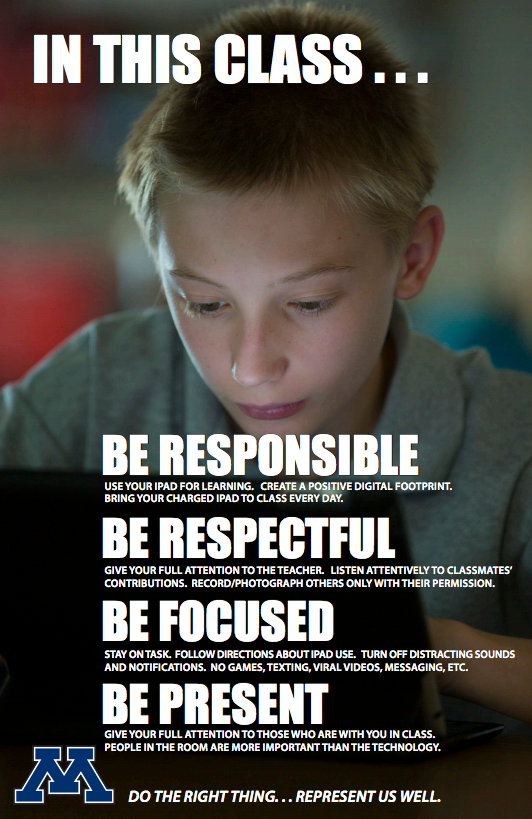
Classroom 1:1 Technology Norms: Responsibility, Respect, Focus & Presence

Setting norms is a helpful exercise for a productive meeting. Norms in the classroom are beneficial, too. As part of our 1:1 program, we have made classroom management a continuous focus (see Tip #5 for a Successful 1:1 Implementation). This is the fifth year we have had "iPad Norm" posters in all of our grade 5-12 1:1 classrooms as part of this continual focus, which provide teachers and students with common language and expectations around using technology for learning. Teachers revisit these norms throughout the year and when necessary, can reference them listed right on the poster hanging on the wall.

Five years ago, high school media specialist Peter Gausmann and instructional technology coach Ben Stanerson drafted these norms with our teachers. (Our 1:1 program began with freshman at our high school six years ago with and was carefully and deliberately rolled out to middle and elementary grades in the years since.) We combined them with photos of our elementary, middle, and high school students using technology and created posters like those shown. Teachers were asked to hang the poster in their classrooms and talk through the points of the poster with students.

At the time, Peter explained to our teachers that "a growing body of work (by Dr. David Walsh and others) stresses the importance of teaching kids how to use technology for learning and how to handle distractions from mobile technologies.  Our goal is to provide all staff with common language and talking points that you can use with students and parents." 

The five norms are:
Be Responsible 
Use your device for learning. Create a positive digital footprint. Bring your charged device to class every day.   
Be Respectful  
Give your full attention to the teacher and other students when they are talking. Listen to and follow the teacher’s directions about technology use. Record/photograph others only with their permission  
Be Focused  
Turn off distracting notifications. Devote your time and attention to learning (no games, texting, cat videos, messaging, etc.)  
Be Present  
Give your full attention to those who are with you in class.
In addition to these norms, we continually work with students to help them use technology safely and responsibly, including other posters with the T.H.I.N.K. acronym posted in classrooms and hallways around the school. We also have a District Digital Citizenship Committee working to set norms for our community around the safe and healthy use of technology. As always, feel free to use these ideas, and if you have your own to share, please do so.

Related Posts:

Monday, October 17, 2016

Minnetonka Schools: Innovation is Now Our Strategic Plan


This is the fifth year Minnetonka Schools has run a innovation idea hunt using a crowd sourcing software program. In the past, we had a district strategic plan and a representative committee of teachers, parents, and administrators who met to brainstorm ideas of ways to improve our schools by generating a multi-year plan. We stopped that process and replaced it with this idea hunt. Innovation is now our strategic plan, and we have an ongoing process to collect ideas to make education better for our students. 

Each year around 120 ideas are posted in three categories: small (below $1,000), medium ($1,000 - $5,000), and large ($5,000+). Over the past five years, many ideas have come to fruition as the result of proposals our staff have submitted. For example, some major ideas have include our Vantage program, TonkaOnline, Minnetonka Research Center, Design for Learning program, and Tonka Codes program. Numerous smaller ideas have started from this process as well.  A couple of examples include moving school picture day to be the same day as open house before school begins and another to flip parent curriculum night with teacher presentations as videos online.

The software we use, Spigit, is also used by a number of major companies like Citi, Siemens, and United Health Care, which is locally headquartered in Minnetonka. We use the software to post ideas to our colleagues, who in turn can comment, question, and vote on each idea. Everyone can participate, from custodians to teachers to administrators. We have students and parents involved in the process of helping vet, test, and support ideas as well. This year, all ideas start out at the site level, with small ideas being developed and tested. The highest rated medium and large ideas from each site will advance to a district-level review.

As one of our principals, Cindy Andress stated, "Innovation is an important way for Minnetonka to respond to the changing needs of our students as well as the changing dynamics of our 21st century world. The great ideas that staff share through the idea hunt is making a big difference in the lives of our students." You can read more about the process and background here as well as in the video below.