Showing posts sorted by relevance for query 1:1. Sort by date Show all posts

Monday, January 8, 2018

More Tips for Successful 1:1 Programs: Ongoing Teacher Sharing, Dialog, Reflection & Colleague Observations

One of the reasons I believe our 1:1 program has been successful is because of our ongoing, sustained professional development, which I've written about in the past. We are now in the seventh year of 1:1, and still providing all of our teachers with about 9 hours annually of professional development related to technology. Whether teachers are in their first or seventh year teaching students with 1:1 devices, they attend multiple training sessions per year. 

Learning to use the device itself is simple, as is learning how to use it in education to move from traditional paper and pencil environments to a digital document cycle. That part doesn't require ongoing training. The reason we do provide continual staff development for our teachers is to help them use technology in ever new and innovative ways to deepen learning for students and make it more meaningful. (See Beyond SAMR Ladders and Pools: A Framework for Teaching & Learning)


As part of our trainings with 1:1 teachers, we have found it beneficial to provide them with time to share ideas with one another and talk through issues, whether we are meeting with a group of new or experienced teachers. Originally we called these conversations Roses & Thorns (what was going well and what is not). More recently some of our instructional technology coaches have called it Roses, Buds & Thorns, adding the sharing of a growth area/goal to the conversation.

Our high school instructional technology coaches have called these meetings "Roundtables." Two past roundtable sessions I attended are pictured.  During the first year teachers are in a 1:1 implementation the roses and thorns shared at these sessions tend to be about logistics and classroom management. After teachers are more experienced and comfortable with 1:1 teaching and learning, the topics and ideas shared become much more complex and creative, as teachers share innovative lesson ideas and ways they have used technology to redefine teaching and learning. Making time for the sharing of these ideas is a great way to spread the wealth of information and experience they collectively have and move your program further forward. We have grouped teachers in a variety of ways besides experience; sometimes teachers have been grouped by subject or grade levels, too. During the share time all ideas are documented so teachers can revisit them afterwards.

Besides sharing ideas with one another, we have also had teachers go out and observe colleagues. I mentioned this in a past post, too. Most recently, our high school instructional technology coaches dedicated 20 minutes of a training session to classroom observations. They asked teachers to visit about three classrooms for around five minutes each, with only one class in their own department. Afterwards they regrouped and debriefed. Teachers shared what they noticed about instruction, student engagement, and the use of technology. 

This process of ongoing sharing, dialog, reflection and colleague observation is one of the keys to our success and growth of our 1:1 program. You can learn more about our it, iPads, and use of technology for learning in the additional related posts below:

Monday, November 14, 2016

Math: An Overlooked Subject in Non-Tablet 1:1 Programs

Education is changing and the way students learn math will never be the same. Technology in the classroom like the iPad allows students to organize and share their work faster than ever before. In Mr. Best’s Calculus class, these tools accelerate an already accelerated class. Students use Notability, Explain Everything and Desmos to explore topics in a deeper, more meaningful way.
Unfortunately math is often an overlooked subject area in most traditional non-tablet 1:1 programs. Yet starting in kindergarten, every student through their senior year of high school spends a good portion of their day in math class. Students can't do much of their work in math classes with technology when they are limited to a traditional keyboard and screen.
In most traditional 1:1 Chromebook or laptop programs I've seen, students have their devices closed during math class and use paper and pencil, because math requires handwriting. (For that matter, a lot of school subjects require handwriting.) Sure, you could type up all numbers and variables in the lines of your equations, change fonts to superscript for each exponent, figure out the special keystrokes for math symbols to insert, and come up with other workarounds,  but have you ever seen anyone take the time to do that?! It would be so cumbersome. And if you think writing in digital ink on a laptop is comparable, you likely haven’t tried for an extended period of time. Occasionally while touring traditional 1:1 programs with keyboards, I’ve seen math students who are using their device as an expensive calculator or have opened up an online textbook. Some teachers in these situations do try to harness the limited technology available for math by incorporating video instruction, YouTube tutorials, Kahn Academy content, and assessment tools.  
Because of the limitations of the device, students in traditional 1:1 programs are limited to consuming content in math rather than interacting and creating it. There is so much power in handwritten notes, sketches, and annotations. The availability and power of digital ink sets 1:1 tablet implementations on a level above that of traditional devices. Since so much of school is handwriting, the ability to use digital ink for note taking and math homework allows students to harness the power of technology for all aspects of their learning. Not only can they access content for learning, they can create it.

In Minnetonka math classrooms, students using Notability write in digital ink, which allows them to write, resize, relocate, change colors, copy, paste, manipulate, pinch, zoom, drag, interact and more with their own handwritten equations and notes. Research has shown that typed up notes aren’t as memorable or helpful and can even be detrimental to learning. The ability to create handwritten notes and so much more on a tablet should be a key factor for consideration not only in math but all subject areas. Math class can be paperless with 1:1 tablets. Tablets allow students to not only create handwritten notes with technology, but redefine what traditional note taking even is compared with paper and pencil in a traditional classroom or traditional keyboard 1:1 environment.
In addition to digital note taking and annotations, students frequently use the camera for both photos and videos which are added to their notes. They quickly snap a picture of the teacher’s example, embed it right within their notes, and then add their own writing and annotations on top of that image. Students in our math classes use Explain Everything to record screencasts to describe their thinking and processing. They can share these videos with one another to teach and reinforce concepts to classmates and provide their teachers with a deeper understanding of what they have learned. Further, visualization and manipulation of objects and graphs are routine in math classes thanks to the power of 1:1 tablets, enhancing students’ understanding of concepts. In the iPads in High School Calculus video, you can see Minnetonka students doing all of these things, including using Desmos for exploring patterns in graphs.

I have written in the past about the need to consider the overall ROI, return on investment, of a device for the life of the device. In the long run, we have found that an iPad provides a bigger bang for the buck than a laptop or Chromebook ($0.38/day). In conversations about device choice, it’s important to reflect on the value you place on all subjects. Consider if and how students could even use the tool you have in mind in subjects like math, art, music, physical education, science, world language, and more. Too often educators and decision makers forget to think this through and elevate the value of a traditional keyboarding device over the value of a tool that can be truly used to enhance learning across all subject areas.

Related Posts:

Monday, July 18, 2016

Tip #5 for a Successful 1:1 Implementation: Make Classroom Management an Early and Continuous Focus

“Teachers new to 1-to-1... need help with classroom management and technology management issues. 1-to-1 programs can thrive or disintegrate on this one issue alone...” (Livingston, Pamela. 1-to-1 Learning: Laptop Programs That Work. Eugene, Or.: International Society for Technology in Education, 2006. Print.)
Even room arrangement is important when moving 
in to a 1:1 environment so teachers can freely walk
anywhere in the room to help students as necessary.
This statement from ten years ago still holds true today. When failed 1:1 initiatives make headlines, I often wonder how much was due to the planners' lack of understanding on just how much classroom dynamics change. Managing a room of students with individual screens and the Internet at their fingertips is not something most teachers were ever taught to do in their undergrad preparatory courses. Plus, until recently, very few teachers ever experienced this environment in their own schooling. It is critical to plan for and address classroom management when beginning a 1:1 program and it is also essential to repeatedly revisit classroom management throughout the following years of implementation in order to be most successful. Like almost all professional development, once and done on this topic isn't enough.

Even though we are starting our sixth year of 1:1 for students in grades 5-12, we continue to revisit and discuss best classroom management practices with our teachers during trainings throughout the year. Each year we also have new teachers hired who are also new to a 1:1 environment, so they need this knowledge and benefit from hearing tips and ideas from their more experienced colleagues, too. Some of the best practices we cover include:

  1. Teachers discuss the need to set up class expectations and routines to help students make the best use of a device and make sure they understand expectations and appropriate use. This includes instructions and discussions with students about listening, focusing and staying on task when using a device. It sounds simple, and some may assume that the students will know what to do, but taking time to discuss "My job" and "Your job", expectations using the devices and what focus and attention mean and look like will pay off.
  2. Teachers also use common vocabulary to efficiently communicate iPad use expectations during class time.  This common language allows for smoother and quicker transitions as students switch between the various activities in a given lesson. Statements like "iPads flat" or "Apples up" (the logo on the back of the iPad, meaning the iPad is face down on a desk) are known by all students in our program.
  3. While it may seem obvious, we remind teachers of the benefits of proximity teaching, moving around the room as they teach versus standing up front. We also encourage teachers to evaluate their room arrangement (as pictured) to make sure they have multiple pathways around their classroom, including a way across the back of the room. For a fun take on proximity teaching, check out Carl Hooker's 2Eyes and Feet App.
  4. We also use technology to help with proximity teaching. Teachers utilize Air Play through a desktop computer program called Reflector to mirror the teacher's iPad. We provide teachers with Splashtop, a remote desktop app, that allows teachers who have traditionally taught from the front of the room to be “unchained” and move freely in their classrooms, improving their use of proximity teaching as a classroom management tool. They are able to control their desktop computer and SMARTBoard which are connected to a projector from anywhere in the room. With both of these tools, teachers have the flexibility to instruct from any location in their classroom using whatever tools they want to utilize. As these tools improve, interactive whiteboards will become obsolete. We are discussing plans to not replace them in the future.
  5. When students aren't following the rules, teachers address the misbehavior and not the device. Think of a student who may be playing a game or watching a video; the misbehavior is being off task. Taking away the 1:1 device would be similar to taking away paper and pencil from a student a decade ago if s/he was caught writing a note or reading a different book. Don't take away a student's learning tools as punishment. Instead, students who are off task may be reminded by the teacher to focus. If the student doesn't stop/correct the issue, perhaps a discussion with the student's parents is scheduled, or a visit with a principal after multiple occurrences. For some students, a solution may be to put their device in Guided Access or remove some apps through Restrictions managed by our MDM. After some time, then this is removed.
These are just a few classroom management tips, but there are more. Our teachers are innovative and creative and always coming up with better ways to do things. This is one of the benefits of our continual professional development; they are always sharing and learning new tips and ideas from one another.

Related Posts:


Monday, October 30, 2017

Top 10 Tips for Successful 1:1 Implementations

Adobe Spark (45).jpg
Last week at our biannual Minnetonka School District Site Visit, one of the breakout sessions for interested attendees was our Top 10 Tips for Successful 1:1 Implementations. Even though our 1:1 program is with iPads, the tips for success apply to any device or platform.

I have written about some of the tips listed below in the past in detail as an individual blog post. You can view the presentation slides farther below which contain links to further information about each of these tips. I hope ideas listed here are beneficial for you. I also hope to write about each of these tips in more detail in the future.
  1. Execute the Planning & Rollout Carefully & Deliberately 
  2. Flip Student Training
  3. Continual & Differentiated Teacher Training
  4. Make Classroom Management an Early & Continuous Focus
  5. Use tools for Formative Assessment 
  6. Promote Collaboration with Google Apps
  7. Have a robust LMS as the Hub of Student Learning 
  8. Inspire Creation vs. Consumption
  9. Teach Students to Be Responsible & Focused
  10. Parent Education is Critical


You can learn more about our 1:1 program, iPads, and use of technology for learning in the related posts below:  

    Monday, October 24, 2016

    Classroom 1:1 Technology Norms: Responsibility, Respect, Focus & Presence

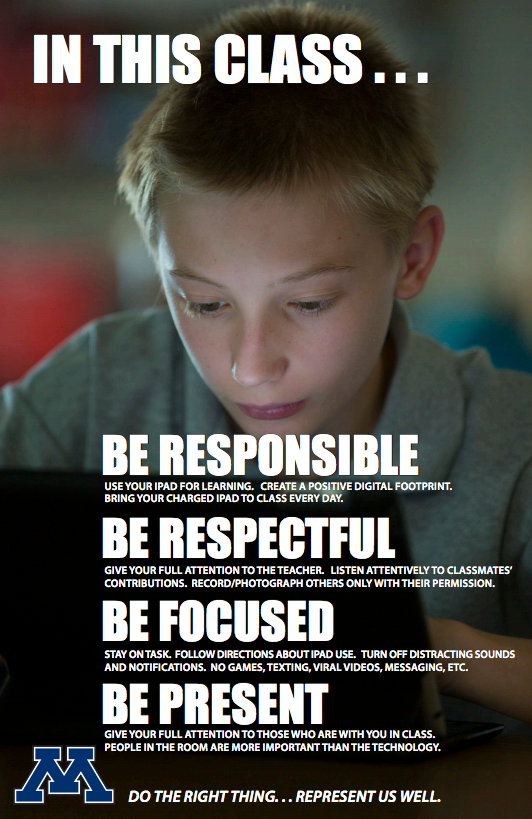
    Setting norms is a helpful exercise for a productive meeting. Norms in the classroom are beneficial, too. As part of our 1:1 program, we have made classroom management a continuous focus (see Tip #5 for a Successful 1:1 Implementation). This is the fifth year we have had "iPad Norm" posters in all of our grade 5-12 1:1 classrooms as part of this continual focus, which provide teachers and students with common language and expectations around using technology for learning. Teachers revisit these norms throughout the year and when necessary, can reference them listed right on the poster hanging on the wall.

    Five years ago, high school media specialist Peter Gausmann and instructional technology coach Ben Stanerson drafted these norms with our teachers. (Our 1:1 program began with freshman at our high school six years ago with and was carefully and deliberately rolled out to middle and elementary grades in the years since.) We combined them with photos of our elementary, middle, and high school students using technology and created posters like those shown. Teachers were asked to hang the poster in their classrooms and talk through the points of the poster with students.

    At the time, Peter explained to our teachers that "a growing body of work (by Dr. David Walsh and others) stresses the importance of teaching kids how to use technology for learning and how to handle distractions from mobile technologies.  Our goal is to provide all staff with common language and talking points that you can use with students and parents." 

    The five norms are:
    Be Responsible 
    Use your device for learning. Create a positive digital footprint. Bring your charged device to class every day.   
    Be Respectful  
    Give your full attention to the teacher and other students when they are talking. Listen to and follow the teacher’s directions about technology use. Record/photograph others only with their permission  
    Be Focused  
    Turn off distracting notifications. Devote your time and attention to learning (no games, texting, cat videos, messaging, etc.)  
    Be Present  
    Give your full attention to those who are with you in class.
    In addition to these norms, we continually work with students to help them use technology safely and responsibly, including other posters with the T.H.I.N.K. acronym posted in classrooms and hallways around the school. We also have a District Digital Citizenship Committee working to set norms for our community around the safe and healthy use of technology. As always, feel free to use these ideas, and if you have your own to share, please do so.

    Related Posts: